
Teachable Machine
PrintThis documentation details using Teachable Machine for image and pose classification, including model loading, classification, displaying results, and converting predictions to JsonValue.
Image
Loading Custom Image Model from URL
Image Model classify objects continuously in video/camera with abort control
{"blocks":"<xml xmlns=\"https://developers.google.com/blockly/xml\"><block type=\"TeachableMachine_loadImageModel\"><value name=\"baseUrl\"><shadow type=\"text\"><field name=\"TEXT\"/></shadow></value></block></xml>"}This is used to load the image model from the URL.
Parameters: String (URL)
Output: Model Predicton Result (From Teachable Machine Image Model)
Sample code:
These blocks can display the Json Value result with getting the image model information.
{"blocks":"<xml xmlns=\"https://developers.google.com/blockly/xml\"><variables><variable>mainLayout</variable><variable>mainScreen</variable><variable>imageModel</variable><variable>predictionResult</variable></variables><block type=\"pxt-on-start\" x=\"0\" y=\"0\"><statement name=\"HANDLER\"><block type=\"variables_set\"><field name=\"VAR\">mainLayout</field><value name=\"VALUE\"><shadow type=\"math_number\"><field name=\"NUM\">0</field></shadow><block type=\"ScreenItem_createLayout\"/></value><next><block type=\"variables_set\"><field name=\"VAR\">mainScreen</field><value name=\"VALUE\"><shadow type=\"math_number\"><field name=\"NUM\">0</field></shadow><block type=\"Screen_create\"><value name=\"label\"><shadow type=\"text\"><field name=\"TEXT\">Main</field></shadow></value><value name=\"layout\"><block type=\"variables_get\"><field name=\"VAR\">mainLayout</field></block></value></block></value><next><block type=\"variables_set\"><field name=\"VAR\">imageModel</field><value name=\"VALUE\"><shadow type=\"math_number\"><field name=\"NUM\">0</field></shadow><block type=\"TeachableMachine_loadImageModel\"><value name=\"baseUrl\"><shadow type=\"text\"><field name=\"TEXT\">https://teachablemachine.withgoogle.com/models/tghdF3FXI/</field></shadow></value></block></value><next><block type=\"variables_set\"><field name=\"VAR\">predictionResult</field><value name=\"VALUE\"><shadow type=\"math_number\"><field name=\"NUM\">0</field></shadow><block type=\"TeachableMachine_ImageModel_predict\"><value name=\"this\"><block type=\"variables_get\"><field name=\"VAR\">imageModel</field></block></value><value name=\"image\"><block type=\"Download_image\"><value name=\"url\"><shadow type=\"text\"><field name=\"TEXT\">https://image.shutterstock.com/image-photo/boy-raising-two-fingers-on-260nw-297974771.jpg</field></shadow></value></block></value></block></value><next><block type=\"ScreenItem_Layout_add\"><value name=\"this\"><block type=\"variables_get\"><field name=\"VAR\">mainLayout</field></block></value><value name=\"item\"><block type=\"Download_image\"><value name=\"url\"><shadow type=\"text\"><field name=\"TEXT\">https://image.shutterstock.com/image-photo/boy-raising-two-fingers-on-260nw-297974771.jpg</field></shadow></value></block></value><next><block type=\"ScreenItem_Layout_add\"><value name=\"this\"><block type=\"variables_get\"><field name=\"VAR\">mainLayout</field></block></value><value name=\"item\"><block type=\"Control_createTextBlock\"><mutation xmlns=\"http://www.w3.org/1999/xhtml\" _expanded=\"1\" _input_init=\"true\"></mutation><value name=\"text\"><block type=\"Json_JsonValue_stringify\"><mutation xmlns=\"http://www.w3.org/1999/xhtml\" _expanded=\"0\" _input_init=\"false\"></mutation><value name=\"jsonValue\"><block type=\"TeachableMachine_ImagePredictionResult_getResultAsJsonValue\"><value name=\"this\"><block type=\"variables_get\"><field name=\"VAR\">predictionResult</field></block></value></block></value></block></value></block></value></block></next></block></next></block></next></block></next></block></next></block></statement></block></xml>"}The output:
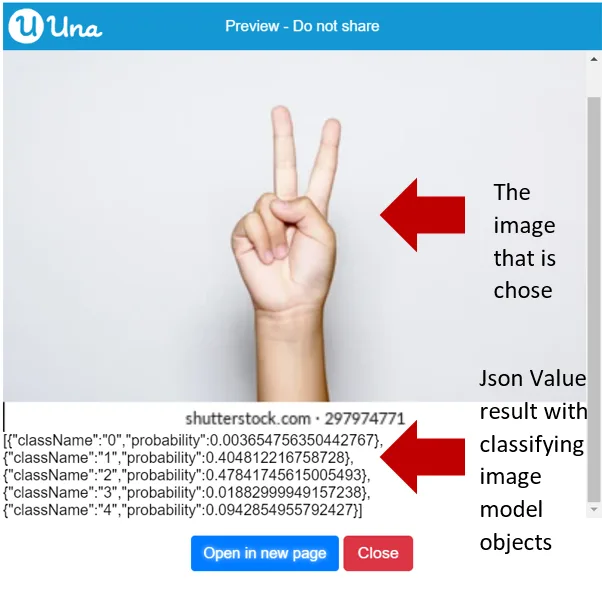
References:
- Trained Google Teachable Machine Model: https://teachablemachine.withgoogle.com/models/tghdF3FXI/
- Photo being used in this example: https://image.shutterstock.com/image-photo/boy-raising-two-fingers-on-260nw-297974771.jpg

Loading the Image Model from Internet with Abort Control
Image Model classify objects continuously in video/camera with abort control
{"blocks":"<xml xmlns=\"https://developers.google.com/blockly/xml\"><block type=\"TeachableMachine_ImageModel_continuouslyPredict\"><value name=\"this\"><block type=\"variables_get\"><field name=\"VAR\">imageModel</field></block></value><value name=\"HANDLER_DRAG_PARAM_result\"><shadow type=\"variables_get_reporter\"><field name=\"VAR\">result</field></shadow></value></block></xml>"}This is used to load and classify the image model from the URL.
Parameters:
- AI Model (Teachable Machine Image Model)
- Camera
- Task (Abort Control)
- Model Prediction Result (From Teachable Machine Image Model)
Output: N/A
Sample code:
{"blocks":"<xml xmlns=\"https://developers.google.com/blockly/xml\"><block type=\"Camera_setOnCameraControlChanged\"><value name=\"HANDLER_DRAG_PARAM_selectedCameras\"><shadow type=\"variables_get_reporter\"><field name=\"VAR\">selectedCameras</field></shadow></value><value name=\"HANDLER_DRAG_PARAM_recentlySelectedCameras\"><shadow type=\"variables_get_reporter\"><field name=\"VAR\">recentlySelectedCameras</field></shadow></value><value name=\"HANDLER_DRAG_PARAM_recentlyUnselectedCameras\"><shadow type=\"variables_get_reporter\"><field name=\"VAR\">recentlyUnselectedCameras</field></shadow></value><statement name=\"HANDLER\"><block type=\"pxt_controls_for_of\"><value name=\"VAR\"><shadow type=\"variables_get_reporter\"><field name=\"VAR\">value2</field></shadow></value><value name=\"LIST\"><block type=\"variables_get\"><field name=\"VAR\">recentlySelectedCameras</field></block></value><statement name=\"DO\"><block type=\"ScreenItem_Layout_add\"><value name=\"this\"><block type=\"variables_get\"><field name=\"VAR\">mainLayout</field></block></value><value name=\"item\"><block type=\"variables_get\"><field name=\"VAR\">value2</field></block></value><next><block type=\"variables_set\"><field name=\"VAR\">resultTextBlock</field><value name=\"VALUE\"><shadow type=\"math_number\"><field name=\"NUM\">0</field></shadow><block type=\"Control_createTextBlock\"><mutation xmlns=\"http://www.w3.org/1999/xhtml\" _expanded=\"0\" _input_init=\"false\"></mutation></block></value><next><block type=\"ScreenItem_Layout_add\"><value name=\"this\"><block type=\"variables_get\"><field name=\"VAR\">mainLayout</field></block></value><value name=\"item\"><block type=\"variables_get\"><field name=\"VAR\">resultTextBlock</field></block></value><next><block type=\"TeachableMachine_ImageModel_continuouslyPredict\"><value name=\"this\"><block type=\"variables_get\"><field name=\"VAR\">imageModel</field></block></value><value name=\"video\"><block type=\"variables_get\"><field name=\"VAR\">value2</field></block></value><value name=\"abortControl\"><block type=\"variables_get\"><field name=\"VAR\">detectionAbortControl</field></block></value><value name=\"HANDLER_DRAG_PARAM_result\"><shadow type=\"variables_get_reporter\"><field name=\"VAR\">result</field></shadow></value><statement name=\"HANDLER\"><block type=\"Control_TextBlock_setContent\"><value name=\"this\"><block type=\"variables_get\"><field name=\"VAR\">resultTextBlock</field></block></value><value name=\"content\"><block type=\"Json_JsonValue_stringify\"><mutation xmlns=\"http://www.w3.org/1999/xhtml\" _expanded=\"0\" _input_init=\"false\"></mutation><value name=\"jsonValue\"><block type=\"TeachableMachine_ImagePredictionResult_getResultAsJsonValue\"><value name=\"this\"><block type=\"variables_get\"><field name=\"VAR\">result</field></block></value></block></value></block></value><next><block type=\"Task_sleep\"><value name=\"ms\"><shadow type=\"math_number\"><field name=\"NUM\">1000</field></shadow></value></block></next></block></statement></block></next></block></next></block></next></block></statement></block></statement></block></xml>"}{"blocks":"<xml xmlns=\"https://developers.google.com/blockly/xml\"><variables><variable>mainLayout</variable><variable>mainScreen</variable><variable>imageModel</variable><variable>cameraControl</variable><variable>selectedCameras</variable><variable>recentlySelectedCameras</variable><variable>recentlyUnselectedCameras</variable><variable>value2</variable><variable>resultTextBlock</variable><variable>detectionAbortControl</variable><variable>result</variable></variables><block type=\"pxt-on-start\" x=\"0\" y=\"0\"><statement name=\"HANDLER\"><block type=\"variables_set\"><field name=\"VAR\">mainLayout</field><value name=\"VALUE\"><shadow type=\"math_number\"><field name=\"NUM\">0</field></shadow><block type=\"ScreenItem_createLayout\"/></value><next><block type=\"variables_set\"><field name=\"VAR\">mainScreen</field><value name=\"VALUE\"><shadow type=\"math_number\"><field name=\"NUM\">0</field></shadow><block type=\"Screen_create\"><value name=\"label\"><shadow type=\"text\"><field name=\"TEXT\">Main</field></shadow></value><value name=\"layout\"><block type=\"variables_get\"><field name=\"VAR\">mainLayout</field></block></value></block></value><next><block type=\"variables_set\"><field name=\"VAR\">imageModel</field><value name=\"VALUE\"><shadow type=\"math_number\"><field name=\"NUM\">0</field></shadow><block type=\"TeachableMachine_loadImageModel\"><value name=\"baseUrl\"><shadow type=\"text\"><field name=\"TEXT\">https://teachablemachine.withgoogle.com/models/tghdF3FXI/</field></shadow></value></block></value><next><block type=\"Camera_enableCameraFeature\"><value name=\"enable\"><shadow type=\"logic_boolean\"><field name=\"BOOL\">TRUE</field></shadow></value><next><block type=\"variables_set\"><field name=\"VAR\">cameraControl</field><value name=\"VALUE\"><shadow type=\"math_number\"><field name=\"NUM\">0</field></shadow><block type=\"Camera_getCameraControl\"/></value><next><block type=\"Control_OptionList_setMultiple\"><value name=\"this\"><block type=\"variables_get\"><field name=\"VAR\">cameraControl</field></block></value><value name=\"isMultiple\"><shadow type=\"logic_boolean\"><field name=\"BOOL\">TRUE</field></shadow></value><next><block type=\"ScreenItem_Layout_add\"><value name=\"this\"><block type=\"variables_get\"><field name=\"VAR\">mainLayout</field></block></value><value name=\"item\"><block type=\"variables_get\"><field name=\"VAR\">cameraControl</field></block></value><next><block type=\"Camera_setOnCameraControlChanged\"><value name=\"HANDLER_DRAG_PARAM_selectedCameras\"><shadow type=\"variables_get_reporter\"><field name=\"VAR\">selectedCameras</field></shadow></value><value name=\"HANDLER_DRAG_PARAM_recentlySelectedCameras\"><shadow type=\"variables_get_reporter\"><field name=\"VAR\">recentlySelectedCameras</field></shadow></value><value name=\"HANDLER_DRAG_PARAM_recentlyUnselectedCameras\"><shadow type=\"variables_get_reporter\"><field name=\"VAR\">recentlyUnselectedCameras</field></shadow></value><statement name=\"HANDLER\"><block type=\"pxt_controls_for_of\"><value name=\"VAR\"><shadow type=\"variables_get_reporter\"><field name=\"VAR\">value2</field></shadow></value><value name=\"LIST\"><block type=\"variables_get\"><field name=\"VAR\">recentlySelectedCameras</field></block></value><statement name=\"DO\"><block type=\"ScreenItem_Layout_add\"><value name=\"this\"><block type=\"variables_get\"><field name=\"VAR\">mainLayout</field></block></value><value name=\"item\"><block type=\"variables_get\"><field name=\"VAR\">value2</field></block></value><next><block type=\"variables_set\"><field name=\"VAR\">resultTextBlock</field><value name=\"VALUE\"><shadow type=\"math_number\"><field name=\"NUM\">0</field></shadow><block type=\"Control_createTextBlock\"><mutation xmlns=\"http://www.w3.org/1999/xhtml\" _expanded=\"0\" _input_init=\"false\"></mutation></block></value><next><block type=\"ScreenItem_Layout_add\"><value name=\"this\"><block type=\"variables_get\"><field name=\"VAR\">mainLayout</field></block></value><value name=\"item\"><block type=\"variables_get\"><field name=\"VAR\">resultTextBlock</field></block></value><next><block type=\"TeachableMachine_ImageModel_continuouslyPredict\"><value name=\"this\"><block type=\"variables_get\"><field name=\"VAR\">imageModel</field></block></value><value name=\"video\"><block type=\"variables_get\"><field name=\"VAR\">value2</field></block></value><value name=\"abortControl\"><block type=\"variables_get\"><field name=\"VAR\">detectionAbortControl</field></block></value><value name=\"HANDLER_DRAG_PARAM_result\"><shadow type=\"variables_get_reporter\"><field name=\"VAR\">result</field></shadow></value><statement name=\"HANDLER\"><block type=\"Control_TextBlock_setContent\"><value name=\"this\"><block type=\"variables_get\"><field name=\"VAR\">resultTextBlock</field></block></value><value name=\"content\"><block type=\"Json_JsonValue_stringify\"><mutation xmlns=\"http://www.w3.org/1999/xhtml\" _expanded=\"0\" _input_init=\"false\"></mutation><value name=\"jsonValue\"><block type=\"TeachableMachine_ImagePredictionResult_getResultAsJsonValue\"><value name=\"this\"><block type=\"variables_get\"><field name=\"VAR\">result</field></block></value></block></value></block></value><next><block type=\"Task_sleep\"><value name=\"ms\"><shadow type=\"math_number\"><field name=\"NUM\">1000</field></shadow></value></block></next></block></statement></block></next></block></next></block></next></block></statement></block></statement><next><block type=\"variables_set\"><field name=\"VAR\">detectionAbortControl</field><value name=\"VALUE\"><shadow type=\"math_number\"><field name=\"NUM\">0</field></shadow><block type=\"Task_createAbortControl\"/></value></block></next></block></next></block></next></block></next></block></next></block></next></block></next></block></next></block></statement></block></xml>"}The output:
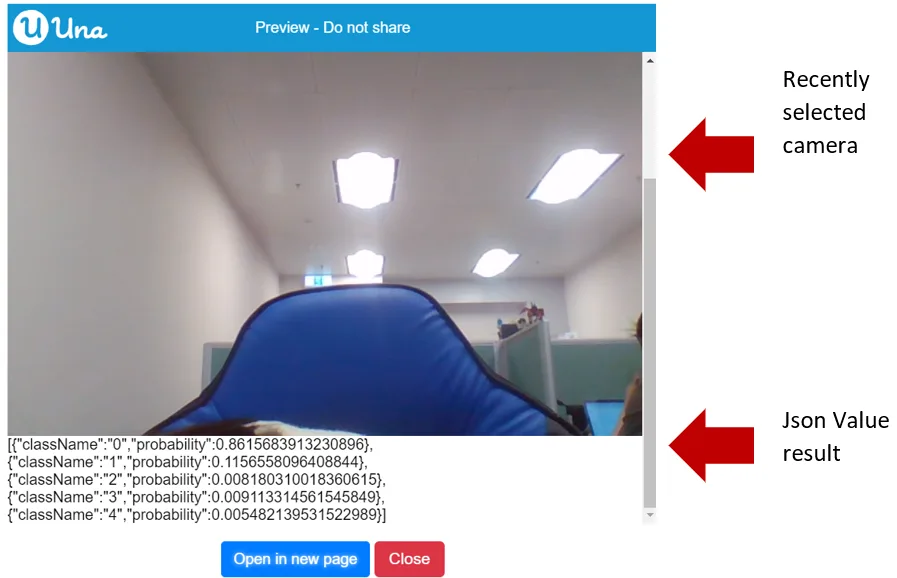
References:
- Trained Google Teachable Machine Model: https://teachablemachine.withgoogle.com/models/tghdF3FXI/
Classifying Objects on Image
Image Model classify objects on image
{"blocks":"<xml xmlns=\"https://developers.google.com/blockly/xml\"><block type=\"TeachableMachine_ImageModel_predict\"><value name=\"this\"><block type=\"variables_get\"><field name=\"VAR\">imageModel</field></block></value></block></xml>"}This is used for loading the image model and classify objects on image, not on camera.
Parameters:
- AI Model (Teachable Machine Image Model)
- Image
Output: Model Prediction Result (From Teachable Machine Image Model)
Sample code:
{"blocks":"<xml xmlns=\"https://developers.google.com/blockly/xml\"><variables><variable>mainLayout</variable><variable>mainScreen</variable><variable>imageModel</variable><variable>classify</variable></variables><block type=\"pxt-on-start\" x=\"0\" y=\"0\"><statement name=\"HANDLER\"><block type=\"variables_set\"><field name=\"VAR\">mainLayout</field><value name=\"VALUE\"><shadow type=\"math_number\"><field name=\"NUM\">0</field></shadow><block type=\"ScreenItem_createLayout\"/></value><next><block type=\"variables_set\"><field name=\"VAR\">mainScreen</field><value name=\"VALUE\"><shadow type=\"math_number\"><field name=\"NUM\">0</field></shadow><block type=\"Screen_create\"><value name=\"label\"><shadow type=\"text\"><field name=\"TEXT\">Main</field></shadow></value><value name=\"layout\"><block type=\"variables_get\"><field name=\"VAR\">mainLayout</field></block></value></block></value><next><block type=\"variables_set\"><field name=\"VAR\">imageModel</field><value name=\"VALUE\"><shadow type=\"math_number\"><field name=\"NUM\">0</field></shadow><block type=\"TeachableMachine_loadImageModel\"><value name=\"baseUrl\"><shadow type=\"text\"><field name=\"TEXT\">https://teachablemachine.withgoogle.com/models/tghdF3FXI/</field></shadow></value></block></value><next><block type=\"variables_set\"><field name=\"VAR\">classify</field><value name=\"VALUE\"><shadow type=\"math_number\"><field name=\"NUM\">0</field></shadow><block type=\"TeachableMachine_ImageModel_predict\"><value name=\"this\"><block type=\"variables_get\"><field name=\"VAR\">imageModel</field></block></value><value name=\"image\"><block type=\"Download_image\"><value name=\"url\"><shadow type=\"text\"><field name=\"TEXT\">https://upload.wikimedia.org/wikipedia/commons/d/d1/One_finger.jpg</field></shadow></value></block></value></block></value><next><block type=\"ScreenItem_Layout_add\"><value name=\"this\"><block type=\"variables_get\"><field name=\"VAR\">mainLayout</field></block></value><value name=\"item\"><block type=\"Download_image\"><value name=\"url\"><shadow type=\"text\"><field name=\"TEXT\">https://upload.wikimedia.org/wikipedia/commons/d/d1/One_finger.jpg</field></shadow></value></block></value><next><block type=\"ScreenItem_Layout_add\"><value name=\"this\"><block type=\"variables_get\"><field name=\"VAR\">mainLayout</field></block></value><value name=\"item\"><block type=\"Control_createTextBlock\"><mutation xmlns=\"http://www.w3.org/1999/xhtml\" _expanded=\"1\" _input_init=\"true\"></mutation><value name=\"text\"><block type=\"Json_JsonValue_stringify\"><mutation xmlns=\"http://www.w3.org/1999/xhtml\" _expanded=\"0\" _input_init=\"false\"></mutation><value name=\"jsonValue\"><block type=\"TeachableMachine_ImagePredictionResult_getResultAsJsonValue\"><value name=\"this\"><block type=\"variables_get\"><field name=\"VAR\">classify</field></block></value></block></value></block></value></block></value></block></next></block></next></block></next></block></next></block></next></block></statement></block></xml>"}The output:
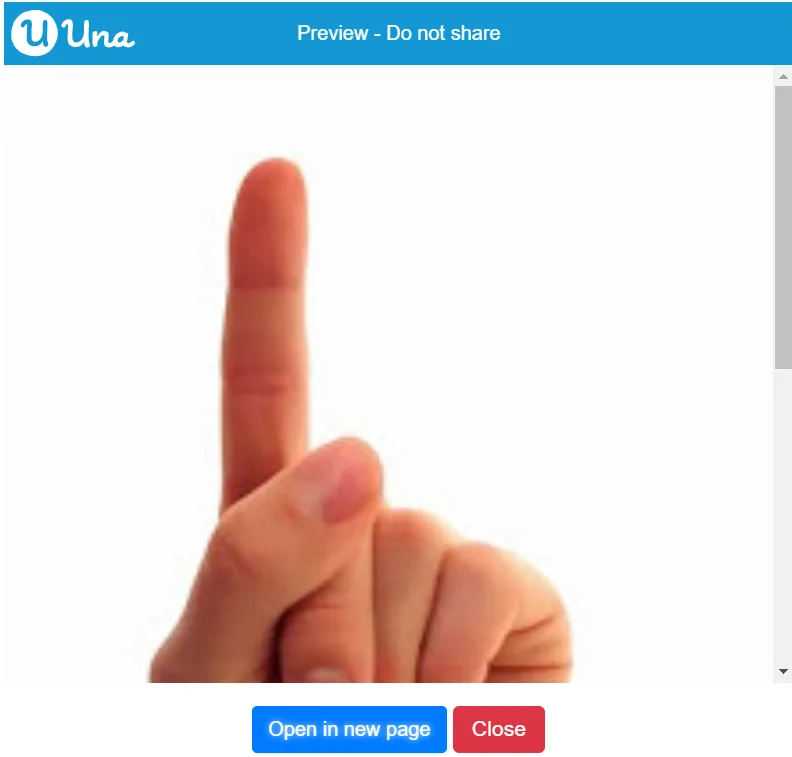
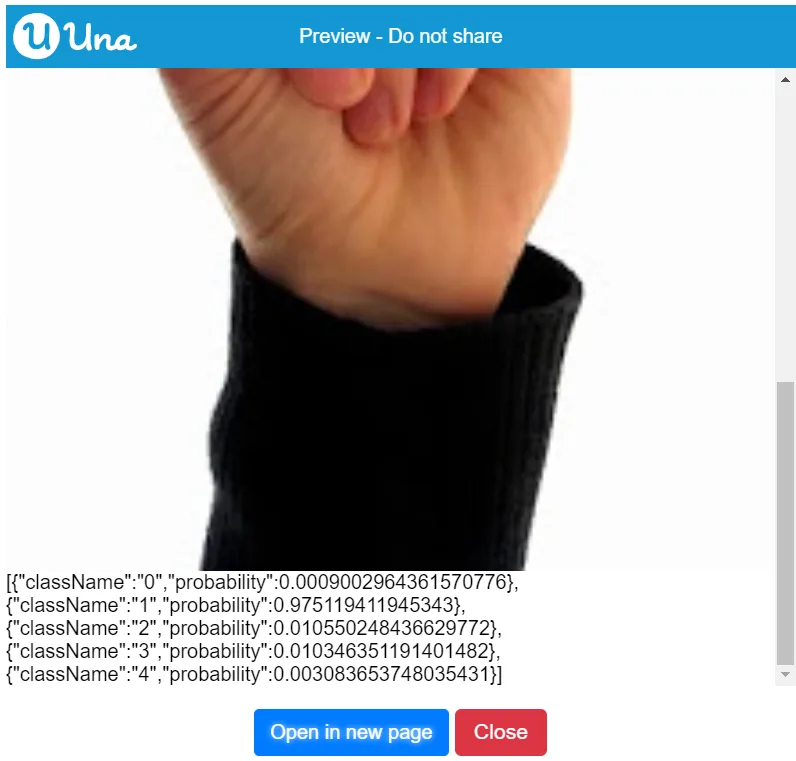
References:
- Trained Google Teachable Machine Model: https://teachablemachine.withgoogle.com/models/tghdF3FXI/
- Photo being used in this example: https://upload.wikimedia.org/wikipedia/commons/d/d1/One_finger.jpg

Showing the Class Labels in Image Model
Image Model get class labels
{"blocks":"<xml xmlns=\"https://developers.google.com/blockly/xml\"><block type=\"TeachableMachine_ImageModel_getClassLabels\"><value name=\"this\"><block type=\"variables_get\"><field name=\"VAR\">imageModel</field></block></value></block></xml>"}This is used for getting class labels from image model.
Parameters: AI Model (Teachable Machine Image Model)
Output: Array
Sample code:
{"blocks":"<xml xmlns=\"https://developers.google.com/blockly/xml\"><variables><variable>mainLayout</variable><variable>mainScreen</variable><variable>imageModel</variable><variable>classify</variable><variable>label</variable><variable>index</variable></variables><block type=\"pxt-on-start\" x=\"0\" y=\"0\"><statement name=\"HANDLER\"><block type=\"variables_set\"><field name=\"VAR\">mainLayout</field><value name=\"VALUE\"><shadow type=\"math_number\"><field name=\"NUM\">0</field></shadow><block type=\"ScreenItem_createLayout\"/></value><next><block type=\"variables_set\"><field name=\"VAR\">mainScreen</field><value name=\"VALUE\"><shadow type=\"math_number\"><field name=\"NUM\">0</field></shadow><block type=\"Screen_create\"><value name=\"label\"><shadow type=\"text\"><field name=\"TEXT\">Main</field></shadow></value><value name=\"layout\"><block type=\"variables_get\"><field name=\"VAR\">mainLayout</field></block></value></block></value><next><block type=\"variables_set\"><field name=\"VAR\">imageModel</field><value name=\"VALUE\"><shadow type=\"math_number\"><field name=\"NUM\">0</field></shadow><block type=\"TeachableMachine_loadImageModel\"><value name=\"baseUrl\"><shadow type=\"text\"><field name=\"TEXT\">https://teachablemachine.withgoogle.com/models/tghdF3FXI/</field></shadow></value></block></value><next><block type=\"variables_set\"><field name=\"VAR\">classify</field><value name=\"VALUE\"><shadow type=\"math_number\"><field name=\"NUM\">0</field></shadow><block type=\"TeachableMachine_ImageModel_predict\"><value name=\"this\"><block type=\"variables_get\"><field name=\"VAR\">imageModel</field></block></value><value name=\"image\"><block type=\"Download_image\"><value name=\"url\"><shadow type=\"text\"><field name=\"TEXT\">https://image.shutterstock.com/image-photo/boy-raising-two-fingers-on-260nw-297974771.jpg</field></shadow></value></block></value></block></value><next><block type=\"variables_set\"><field name=\"VAR\">label</field><value name=\"VALUE\"><shadow type=\"math_number\"><field name=\"NUM\">0</field></shadow><block type=\"TeachableMachine_ImageModel_getClassLabels\"><value name=\"this\"><block type=\"variables_get\"><field name=\"VAR\">imageModel</field></block></value></block></value><next><block type=\"ScreenItem_Layout_add\"><value name=\"this\"><block type=\"variables_get\"><field name=\"VAR\">mainLayout</field></block></value><value name=\"item\"><block type=\"Download_image\"><value name=\"url\"><shadow type=\"text\"><field name=\"TEXT\">https://image.shutterstock.com/image-photo/boy-raising-two-fingers-on-260nw-297974771.jpg</field></shadow></value></block></value><next><block type=\"ScreenItem_Layout_add\"><value name=\"this\"><block type=\"variables_get\"><field name=\"VAR\">mainLayout</field></block></value><value name=\"item\"><block type=\"Control_createTextBlock\"><mutation xmlns=\"http://www.w3.org/1999/xhtml\" _expanded=\"1\" _input_init=\"true\"></mutation><value name=\"text\"><block type=\"Json_JsonValue_stringify\"><mutation xmlns=\"http://www.w3.org/1999/xhtml\" _expanded=\"0\" _input_init=\"false\"></mutation><value name=\"jsonValue\"><block type=\"TeachableMachine_ImagePredictionResult_getResultAsJsonValue\"><value name=\"this\"><block type=\"variables_get\"><field name=\"VAR\">classify</field></block></value></block></value></block></value></block></value><next><block type=\"pxt_controls_for\"><value name=\"VAR\"><shadow type=\"variables_get_reporter\"><field name=\"VAR\">index</field></shadow></value><value name=\"TO\"><shadow type=\"math_whole_number\"><field name=\"NUM\">0</field></shadow><block type=\"lists_length\"><value name=\"VALUE\"><block type=\"variables_get\"><field name=\"VAR\">label</field></block></value></block></value><statement name=\"DO\"><block type=\"ScreenItem_Layout_add\"><value name=\"this\"><block type=\"variables_get\"><field name=\"VAR\">mainLayout</field></block></value><value name=\"item\"><block type=\"Control_createTextBlock\"><mutation xmlns=\"http://www.w3.org/1999/xhtml\" _expanded=\"1\" _input_init=\"true\"></mutation><value name=\"text\"><block type=\"lists_index_get\"><value name=\"LIST\"><block type=\"variables_get\"><field name=\"VAR\">label</field></block></value><value name=\"INDEX\"><shadow type=\"math_number\"><field name=\"NUM\">0</field></shadow><block type=\"variables_get\"><field name=\"VAR\">index</field></block></value></block></value></block></value></block></statement></block></next></block></next></block></next></block></next></block></next></block></next></block></next></block></statement></block></xml>"}The output:
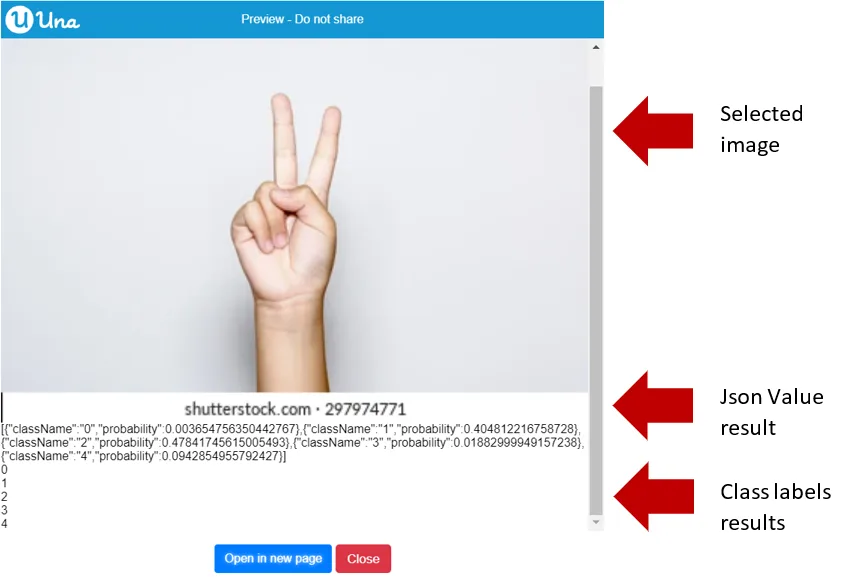
References:
- Trained Google Teachable Machine Model: https://teachablemachine.withgoogle.com/models/tghdF3FXI/
- Photo being used in this example: https://image.shutterstock.com/image-photo/boy-raising-two-fingers-on-260nw-297974771.jpg
Showing the Total Amount of Classes with Image Model
Image Model get total number of classes
{"blocks":"<xml xmlns=\"https://developers.google.com/blockly/xml\"><block type=\"TeachableMachine_ImageModel_getTotalClasses\"><value name=\"this\"><block type=\"variables_get\"><field name=\"VAR\">imageModel</field></block></value></block></xml>"}This is used to get the full number of classes.
Parameters: AI Model (Teachable Machine Image Model)
Output: Number
Sample code:
{"blocks":"<xml xmlns=\"https://developers.google.com/blockly/xml\"><variables><variable>mainLayout</variable><variable>mainScreen</variable><variable>imageModel</variable><variable>classify</variable><variable>total</variable><variable>dateTimeOffset</variable></variables><block type=\"pxt-on-start\" x=\"0\" y=\"0\"><statement name=\"HANDLER\"><block type=\"variables_set\"><field name=\"VAR\">mainLayout</field><value name=\"VALUE\"><shadow type=\"math_number\"><field name=\"NUM\">0</field></shadow><block type=\"ScreenItem_createLayout\"/></value><next><block type=\"variables_set\"><field name=\"VAR\">mainScreen</field><value name=\"VALUE\"><shadow type=\"math_number\"><field name=\"NUM\">0</field></shadow><block type=\"Screen_create\"><value name=\"label\"><shadow type=\"text\"><field name=\"TEXT\">Main</field></shadow></value><value name=\"layout\"><block type=\"variables_get\"><field name=\"VAR\">mainLayout</field></block></value></block></value><next><block type=\"variables_set\"><field name=\"VAR\">imageModel</field><value name=\"VALUE\"><shadow type=\"math_number\"><field name=\"NUM\">0</field></shadow><block type=\"TeachableMachine_loadImageModel\"><value name=\"baseUrl\"><shadow type=\"text\"><field name=\"TEXT\">https://teachablemachine.withgoogle.com/models/tghdF3FXI/</field></shadow></value></block></value><next><block type=\"variables_set\"><field name=\"VAR\">classify</field><value name=\"VALUE\"><shadow type=\"math_number\"><field name=\"NUM\">0</field></shadow><block type=\"TeachableMachine_ImageModel_predict\"><value name=\"this\"><block type=\"variables_get\"><field name=\"VAR\">imageModel</field></block></value><value name=\"image\"><block type=\"Download_image\"><value name=\"url\"><shadow type=\"text\"><field name=\"TEXT\">https://image.shutterstock.com/image-photo/boy-raising-two-fingers-on-260nw-297974771.jpg</field></shadow></value></block></value></block></value><next><block type=\"variables_set\"><field name=\"VAR\">total</field><value name=\"VALUE\"><shadow type=\"math_number\"><field name=\"NUM\">0</field></shadow><block type=\"TeachableMachine_ImageModel_getTotalClasses\"><value name=\"this\"><block type=\"variables_get\"><field name=\"VAR\">imageModel</field></block></value></block></value><next><block type=\"ScreenItem_Layout_add\"><value name=\"this\"><block type=\"variables_get\"><field name=\"VAR\">mainLayout</field></block></value><value name=\"item\"><block type=\"Download_image\"><value name=\"url\"><shadow type=\"text\"><field name=\"TEXT\">https://image.shutterstock.com/image-photo/boy-raising-two-fingers-on-260nw-297974771.jpg</field></shadow></value></block></value><next><block type=\"ScreenItem_Layout_add\"><value name=\"this\"><block type=\"variables_get\"><field name=\"VAR\">mainLayout</field></block></value><value name=\"item\"><block type=\"Control_createTextBlock\"><mutation xmlns=\"http://www.w3.org/1999/xhtml\" _expanded=\"1\" _input_init=\"true\"></mutation><value name=\"text\"><block type=\"Json_JsonValue_stringify\"><mutation xmlns=\"http://www.w3.org/1999/xhtml\" _expanded=\"0\" _input_init=\"false\"></mutation><value name=\"jsonValue\"><block type=\"TeachableMachine_ImagePredictionResult_getResultAsJsonValue\"><value name=\"this\"><block type=\"variables_get\"><field name=\"VAR\">classify</field></block></value></block></value></block></value></block></value><next><block type=\"ScreenItem_Layout_add\"><value name=\"this\"><block type=\"variables_get\"><field name=\"VAR\">mainLayout</field></block></value><value name=\"item\"><block type=\"Control_createTextBlock\"><mutation xmlns=\"http://www.w3.org/1999/xhtml\" _expanded=\"1\" _input_init=\"true\"></mutation><value name=\"text\"><block type=\"DateTime_DateTimeOffset_toString\"><value name=\"dateTimeOffset\"><block type=\"variables_get\"><field name=\"VAR\">total</field></block></value></block></value></block></value></block></next></block></next></block></next></block></next></block></next></block></next></block></next></block></statement></block></xml>"}The output:
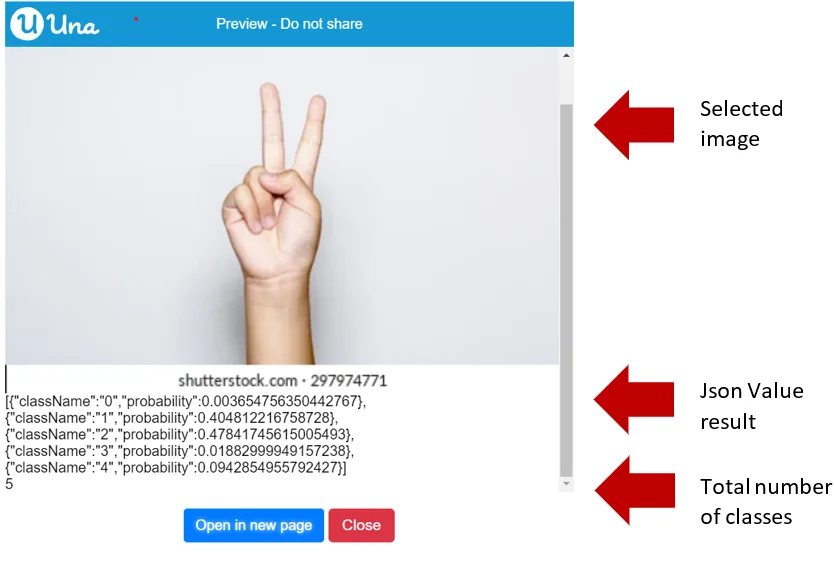
References:
- Trained Google Teachable Machine Model: https://teachablemachine.withgoogle.com/models/tghdF3FXI/
- Photo being used in this example: https://image.shutterstock.com/image-photo/boy-raising-two-fingers-on-260nw-297974771.jpg
Pose
Loading Custom Pose Model from URL
Load pose model from internet
{"blocks":"<xml xmlns=\"https://developers.google.com/blockly/xml\"><block type=\"TeachableMachine_loadPoseModel\"><value name=\"baseUrl\"><shadow type=\"text\"><field name=\"TEXT\"/></shadow></value></block></xml>"}This is used to load the pose model from the internet with the URL.
Parameters: String (URL)
Output: Model Prediction Result (From Teachable Machine Pose Model)
Sample code:
{"blocks":"<xml xmlns=\"https://developers.google.com/blockly/xml\"><variables><variable>mainLayout</variable><variable>mainScreen</variable><variable>imageModel</variable><variable>classify</variable></variables><block type=\"pxt-on-start\" x=\"0\" y=\"0\"><statement name=\"HANDLER\"><block type=\"variables_set\"><field name=\"VAR\">mainLayout</field><value name=\"VALUE\"><shadow type=\"math_number\"><field name=\"NUM\">0</field></shadow><block type=\"ScreenItem_createLayout\"/></value><next><block type=\"variables_set\"><field name=\"VAR\">mainScreen</field><value name=\"VALUE\"><shadow type=\"math_number\"><field name=\"NUM\">0</field></shadow><block type=\"Screen_create\"><value name=\"label\"><shadow type=\"text\"><field name=\"TEXT\">Main</field></shadow></value><value name=\"layout\"><block type=\"variables_get\"><field name=\"VAR\">mainLayout</field></block></value></block></value><next><block type=\"variables_set\"><field name=\"VAR\">imageModel</field><value name=\"VALUE\"><shadow type=\"math_number\"><field name=\"NUM\">0</field></shadow><block type=\"TeachableMachine_loadImageModel\"><value name=\"baseUrl\"><shadow type=\"text\"><field name=\"TEXT\">https://teachablemachine.withgoogle.com/models/tghdF3FXI/</field></shadow></value></block></value><next><block type=\"variables_set\"><field name=\"VAR\">classify</field><value name=\"VALUE\"><shadow type=\"math_number\"><field name=\"NUM\">0</field></shadow><block type=\"TeachableMachine_ImageModel_predict\"><value name=\"this\"><block type=\"variables_get\"><field name=\"VAR\">imageModel</field></block></value><value name=\"image\"><block type=\"Download_image\"><value name=\"url\"><shadow type=\"text\"><field name=\"TEXT\">https://image.shutterstock.com/image-photo/boy-raising-two-fingers-on-260nw-297974771.jpg</field></shadow></value></block></value></block></value><next><block type=\"ScreenItem_Layout_add\"><value name=\"this\"><block type=\"variables_get\"><field name=\"VAR\">mainLayout</field></block></value><value name=\"item\"><block type=\"Download_image\"><value name=\"url\"><shadow type=\"text\"><field name=\"TEXT\">https://image.shutterstock.com/image-photo/boy-raising-two-fingers-on-260nw-297974771.jpg</field></shadow></value></block></value><next><block type=\"ScreenItem_Layout_add\"><value name=\"this\"><block type=\"variables_get\"><field name=\"VAR\">mainLayout</field></block></value><value name=\"item\"><block type=\"Control_createTextBlock\"><mutation xmlns=\"http://www.w3.org/1999/xhtml\" _expanded=\"1\" _input_init=\"true\"></mutation><value name=\"text\"><block type=\"Json_JsonValue_stringify\"><mutation xmlns=\"http://www.w3.org/1999/xhtml\" _expanded=\"0\" _input_init=\"false\"></mutation><value name=\"jsonValue\"><block type=\"TeachableMachine_ImagePredictionResult_getResultAsJsonValue\"><value name=\"this\"><block type=\"variables_get\"><field name=\"VAR\">classify</field></block></value></block></value></block></value></block></value></block></next></block></next></block></next></block></next></block></next></block></statement></block></xml>"}The output:
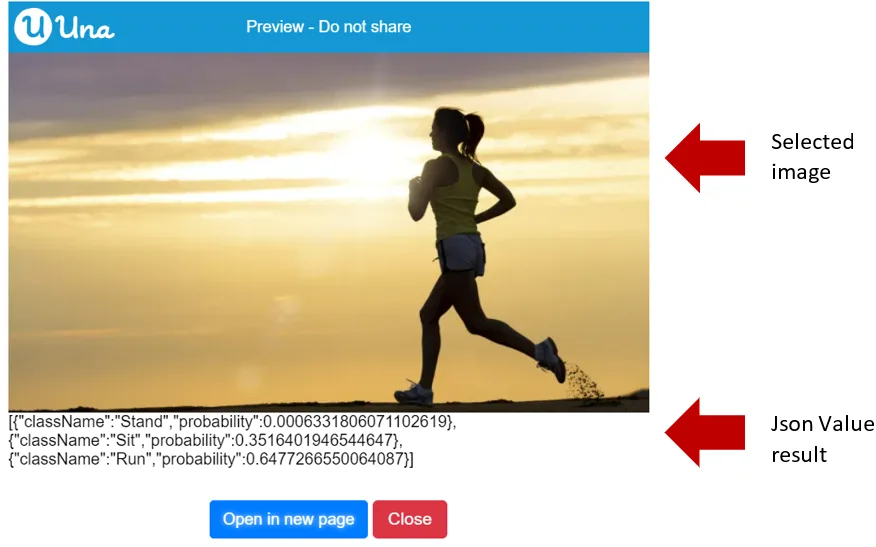
References:
- Trained Google Teachable Machine Model: https://teachablemachine.withgoogle.com/models/LL-rF1gZS/
- Photo being used in this example: https://i2.wp.com/runnersfirst.co.uk/wp-content/uploads/2019/01/running-woman.jpg?resize=678%2C381&ssl=1

Loading the Pose Model from Internet with Abort Control
Pose Model classify pose continuously in video/camera with abort control result
{"blocks":"<xml xmlns=\"https://developers.google.com/blockly/xml\"><block type=\"TeachableMachine_PoseModel_continuouslyPredict\"><value name=\"this\"><block type=\"variables_get\"><field name=\"VAR\">poseModel</field></block></value><value name=\"HANDLER_DRAG_PARAM_result\"><shadow type=\"variables_get_reporter\"><field name=\"VAR\">result</field></shadow></value></block></xml>"}This is used to load and classify the pose model from the URL.
Parameters:
- AI Model (Teachable Machine Pose Model)
- Camera
- Task (Abort Control)
- Model Prediction Result (From Teachable Machine Pose Model)
Output: N/A
Sample code:
Using these blocks can get the pose model and camera for loading the result. Also, it can create the abort control for detection. The output should keep changing.
{"blocks":"<xml xmlns=\"https://developers.google.com/blockly/xml\"><block type=\"Camera_setOnCameraControlChanged\"><value name=\"HANDLER_DRAG_PARAM_selectedCameras\"><shadow type=\"variables_get_reporter\"><field name=\"VAR\">selectedCameras</field></shadow></value><value name=\"HANDLER_DRAG_PARAM_recentlySelectedCameras\"><shadow type=\"variables_get_reporter\"><field name=\"VAR\">recentlySelectedCameras</field></shadow></value><value name=\"HANDLER_DRAG_PARAM_recentlyUnselectedCameras\"><shadow type=\"variables_get_reporter\"><field name=\"VAR\">recentlyUnselectedCameras</field></shadow></value><statement name=\"HANDLER\"><block type=\"pxt_controls_for_of\"><value name=\"VAR\"><shadow type=\"variables_get_reporter\"><field name=\"VAR\">value</field></shadow></value><value name=\"LIST\"><block type=\"variables_get\"><field name=\"VAR\">recentlySelectedCameras</field></block></value><statement name=\"DO\"><block type=\"ScreenItem_Layout_add\"><value name=\"this\"><block type=\"variables_get\"><field name=\"VAR\">mainLayout</field></block></value><value name=\"item\"><block type=\"variables_get\"><field name=\"VAR\">value</field></block></value><next><block type=\"variables_set\"><field name=\"VAR\">resultTextBlock</field><value name=\"VALUE\"><shadow type=\"math_number\"><field name=\"NUM\">0</field></shadow><block type=\"Control_createTextBlock\"><mutation xmlns=\"http://www.w3.org/1999/xhtml\" _expanded=\"0\" _input_init=\"false\"></mutation></block></value><next><block type=\"ScreenItem_Layout_add\"><value name=\"this\"><block type=\"variables_get\"><field name=\"VAR\">mainLayout</field></block></value><value name=\"item\"><block type=\"variables_get\"><field name=\"VAR\">resultTextBlock</field></block></value><next><block type=\"TeachableMachine_PoseModel_continuouslyPredict\"><value name=\"this\"><block type=\"variables_get\"><field name=\"VAR\">poseModel</field></block></value><value name=\"video\"><block type=\"variables_get\"><field name=\"VAR\">value</field></block></value><value name=\"abortControl\"><block type=\"variables_get\"><field name=\"VAR\">detectionAbortControl</field></block></value><value name=\"HANDLER_DRAG_PARAM_result\"><shadow type=\"variables_get_reporter\"><field name=\"VAR\">result</field></shadow></value><statement name=\"HANDLER\"><block type=\"Control_TextBlock_setContent\"><value name=\"this\"><block type=\"variables_get\"><field name=\"VAR\">resultTextBlock</field></block></value><value name=\"content\"><block type=\"Json_JsonValue_stringify\"><mutation xmlns=\"http://www.w3.org/1999/xhtml\" _expanded=\"0\" _input_init=\"false\"></mutation><value name=\"jsonValue\"><block type=\"TeachableMachine_ImagePredictionResult_getResultAsJsonValue\"><value name=\"this\"><block type=\"variables_get\"><field name=\"VAR\">result</field></block></value></block></value></block></value><next><block type=\"Task_sleep\"><value name=\"ms\"><shadow type=\"math_number\"><field name=\"NUM\">1000</field></shadow></value></block></next></block></statement></block></next></block></next></block></next></block></statement></block></statement></block></xml>"}{"blocks":"<xml xmlns=\"https://developers.google.com/blockly/xml\"><variables><variable>mainLayout</variable><variable>mainScreen</variable><variable>poseModel</variable><variable>cameraControl</variable><variable>selectedCameras</variable><variable>recentlySelectedCameras</variable><variable>recentlyUnselectedCameras</variable><variable>value</variable><variable>resultTextBlock</variable><variable>detectionAbortControl</variable><variable>result</variable></variables><block type=\"pxt-on-start\" x=\"0\" y=\"0\"><statement name=\"HANDLER\"><block type=\"variables_set\"><field name=\"VAR\">mainLayout</field><value name=\"VALUE\"><shadow type=\"math_number\"><field name=\"NUM\">0</field></shadow><block type=\"ScreenItem_createLayout\"/></value><next><block type=\"variables_set\"><field name=\"VAR\">mainScreen</field><value name=\"VALUE\"><shadow type=\"math_number\"><field name=\"NUM\">0</field></shadow><block type=\"Screen_create\"><value name=\"label\"><shadow type=\"text\"><field name=\"TEXT\">Main</field></shadow></value><value name=\"layout\"><block type=\"variables_get\"><field name=\"VAR\">mainLayout</field></block></value></block></value><next><block type=\"variables_set\"><field name=\"VAR\">poseModel</field><value name=\"VALUE\"><shadow type=\"math_number\"><field name=\"NUM\">0</field></shadow><block type=\"TeachableMachine_loadPoseModel\"><value name=\"baseUrl\"><shadow type=\"text\"><field name=\"TEXT\">https://teachablemachine.withgoogle.com/models/LL-rF1gZS/</field></shadow></value></block></value><next><block type=\"Camera_enableCameraFeature\"><value name=\"enable\"><shadow type=\"logic_boolean\"><field name=\"BOOL\">TRUE</field></shadow></value><next><block type=\"variables_set\"><field name=\"VAR\">cameraControl</field><value name=\"VALUE\"><shadow type=\"math_number\"><field name=\"NUM\">0</field></shadow><block type=\"Camera_getCameraControl\"/></value><next><block type=\"Control_OptionList_setMultiple\"><value name=\"this\"><block type=\"variables_get\"><field name=\"VAR\">cameraControl</field></block></value><value name=\"isMultiple\"><shadow type=\"logic_boolean\"><field name=\"BOOL\">TRUE</field></shadow></value><next><block type=\"ScreenItem_Layout_add\"><value name=\"this\"><block type=\"variables_get\"><field name=\"VAR\">mainLayout</field></block></value><value name=\"item\"><block type=\"variables_get\"><field name=\"VAR\">cameraControl</field></block></value><next><block type=\"Camera_setOnCameraControlChanged\"><value name=\"HANDLER_DRAG_PARAM_selectedCameras\"><shadow type=\"variables_get_reporter\"><field name=\"VAR\">selectedCameras</field></shadow></value><value name=\"HANDLER_DRAG_PARAM_recentlySelectedCameras\"><shadow type=\"variables_get_reporter\"><field name=\"VAR\">recentlySelectedCameras</field></shadow></value><value name=\"HANDLER_DRAG_PARAM_recentlyUnselectedCameras\"><shadow type=\"variables_get_reporter\"><field name=\"VAR\">recentlyUnselectedCameras</field></shadow></value><statement name=\"HANDLER\"><block type=\"pxt_controls_for_of\"><value name=\"VAR\"><shadow type=\"variables_get_reporter\"><field name=\"VAR\">value</field></shadow></value><value name=\"LIST\"><block type=\"variables_get\"><field name=\"VAR\">recentlySelectedCameras</field></block></value><statement name=\"DO\"><block type=\"ScreenItem_Layout_add\"><value name=\"this\"><block type=\"variables_get\"><field name=\"VAR\">mainLayout</field></block></value><value name=\"item\"><block type=\"variables_get\"><field name=\"VAR\">value</field></block></value><next><block type=\"variables_set\"><field name=\"VAR\">resultTextBlock</field><value name=\"VALUE\"><shadow type=\"math_number\"><field name=\"NUM\">0</field></shadow><block type=\"Control_createTextBlock\"><mutation xmlns=\"http://www.w3.org/1999/xhtml\" _expanded=\"0\" _input_init=\"false\"></mutation></block></value><next><block type=\"ScreenItem_Layout_add\"><value name=\"this\"><block type=\"variables_get\"><field name=\"VAR\">mainLayout</field></block></value><value name=\"item\"><block type=\"variables_get\"><field name=\"VAR\">resultTextBlock</field></block></value><next><block type=\"TeachableMachine_PoseModel_continuouslyPredict\"><value name=\"this\"><block type=\"variables_get\"><field name=\"VAR\">poseModel</field></block></value><value name=\"video\"><block type=\"variables_get\"><field name=\"VAR\">value</field></block></value><value name=\"abortControl\"><block type=\"variables_get\"><field name=\"VAR\">detectionAbortControl</field></block></value><value name=\"HANDLER_DRAG_PARAM_result\"><shadow type=\"variables_get_reporter\"><field name=\"VAR\">result</field></shadow></value><statement name=\"HANDLER\"><block type=\"Control_TextBlock_setContent\"><value name=\"this\"><block type=\"variables_get\"><field name=\"VAR\">resultTextBlock</field></block></value><value name=\"content\"><block type=\"Json_JsonValue_stringify\"><mutation xmlns=\"http://www.w3.org/1999/xhtml\" _expanded=\"0\" _input_init=\"false\"></mutation><value name=\"jsonValue\"><block type=\"TeachableMachine_ImagePredictionResult_getResultAsJsonValue\"><value name=\"this\"><block type=\"variables_get\"><field name=\"VAR\">result</field></block></value></block></value></block></value><next><block type=\"Task_sleep\"><value name=\"ms\"><shadow type=\"math_number\"><field name=\"NUM\">1000</field></shadow></value></block></next></block></statement></block></next></block></next></block></next></block></statement></block></statement><next><block type=\"variables_set\"><field name=\"VAR\">detectionAbortControl</field><value name=\"VALUE\"><shadow type=\"math_number\"><field name=\"NUM\">0</field></shadow><block type=\"Task_createAbortControl\"/></value></block></next></block></next></block></next></block></next></block></next></block></next></block></next></block></next></block></statement></block></xml>"}The output:
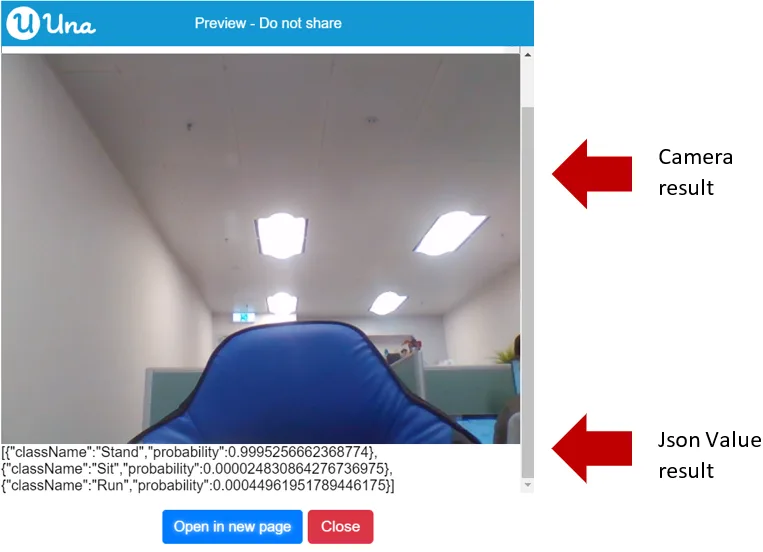
References:
- Trained Google Teachable Machine Model: https://teachablemachine.withgoogle.com/models/JtnKLVtv6/
Classifying Pose on Image
Pose Model classify pose on image
{"blocks":"<xml xmlns=\"https://developers.google.com/blockly/xml\"><block type=\"TeachableMachine_PoseModel_predict\"><value name=\"this\"><block type=\"variables_get\"><field name=\"VAR\">poseModel</field></block></value></block></xml>"}This is used for loading the pose model to classify pose on image, not camera.
Parameters:
- AI Model (Teachable Machine Pose Model)
- Image
Output: Model Prediction Result (From Teachable Machine Pose Model)
Sample code:
{"blocks":"<xml xmlns=\"https://developers.google.com/blockly/xml\"><variables><variable>mainLayout</variable><variable>mainScreen</variable><variable>poseModel</variable><variable>predictionResult</variable></variables><block type=\"pxt-on-start\" x=\"0\" y=\"0\"><statement name=\"HANDLER\"><block type=\"variables_set\"><field name=\"VAR\">mainLayout</field><value name=\"VALUE\"><shadow type=\"math_number\"><field name=\"NUM\">0</field></shadow><block type=\"ScreenItem_createLayout\"/></value><next><block type=\"variables_set\"><field name=\"VAR\">mainScreen</field><value name=\"VALUE\"><shadow type=\"math_number\"><field name=\"NUM\">0</field></shadow><block type=\"Screen_create\"><value name=\"label\"><shadow type=\"text\"><field name=\"TEXT\">Main</field></shadow></value><value name=\"layout\"><block type=\"variables_get\"><field name=\"VAR\">mainLayout</field></block></value></block></value><next><block type=\"variables_set\"><field name=\"VAR\">poseModel</field><value name=\"VALUE\"><shadow type=\"math_number\"><field name=\"NUM\">0</field></shadow><block type=\"TeachableMachine_loadPoseModel\"><value name=\"baseUrl\"><shadow type=\"text\"><field name=\"TEXT\">https://teachablemachine.withgoogle.com/models/LL-rF1gZS/</field></shadow></value></block></value><next><block type=\"variables_set\"><field name=\"VAR\">predictionResult</field><value name=\"VALUE\"><shadow type=\"math_number\"><field name=\"NUM\">0</field></shadow><block type=\"TeachableMachine_PoseModel_predict\"><value name=\"this\"><block type=\"variables_get\"><field name=\"VAR\">poseModel</field></block></value><value name=\"image\"><block type=\"Download_image\"><value name=\"url\"><shadow type=\"text\"><field name=\"TEXT\">https://thumbs.dreamstime.com/b/inviting-business-man-sitting-chair-relaxed-attitude-31717628.jpg</field></shadow></value></block></value></block></value><next><block type=\"ScreenItem_Layout_add\"><value name=\"this\"><block type=\"variables_get\"><field name=\"VAR\">mainLayout</field></block></value><value name=\"item\"><block type=\"Download_image\"><value name=\"url\"><shadow type=\"text\"><field name=\"TEXT\">https://thumbs.dreamstime.com/b/inviting-business-man-sitting-chair-relaxed-attitude-31717628.jpg</field></shadow></value></block></value><next><block type=\"ScreenItem_Layout_add\"><value name=\"this\"><block type=\"variables_get\"><field name=\"VAR\">mainLayout</field></block></value><value name=\"item\"><block type=\"Control_createTextBlock\"><mutation xmlns=\"http://www.w3.org/1999/xhtml\" _expanded=\"1\" _input_init=\"true\"></mutation><value name=\"text\"><block type=\"Json_JsonValue_stringify\"><mutation xmlns=\"http://www.w3.org/1999/xhtml\" _expanded=\"0\" _input_init=\"false\"></mutation><value name=\"jsonValue\"><block type=\"TeachableMachine_ImagePredictionResult_getResultAsJsonValue\"><value name=\"this\"><block type=\"variables_get\"><field name=\"VAR\">predictionResult</field></block></value></block></value></block></value></block></value></block></next></block></next></block></next></block></next></block></next></block></statement></block></xml>"}The output:
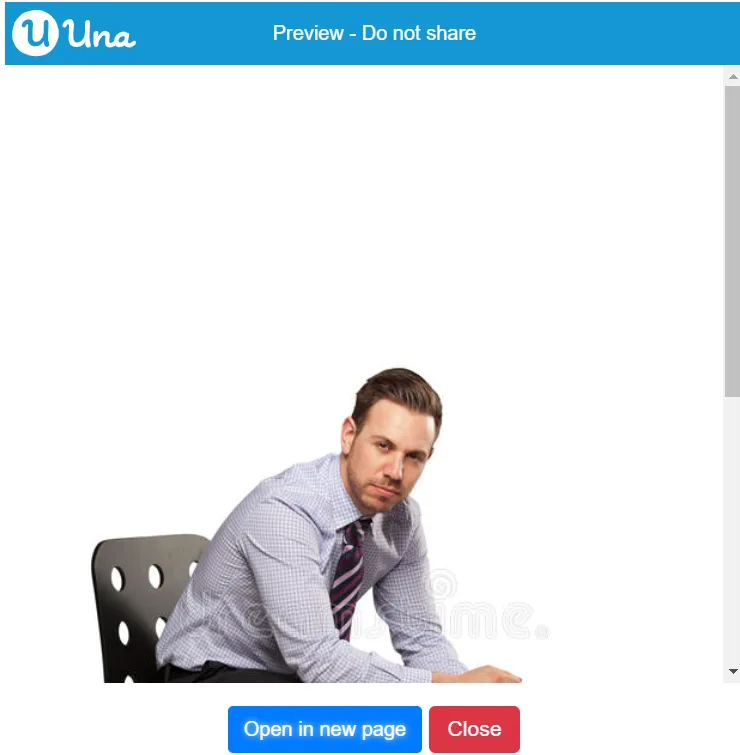
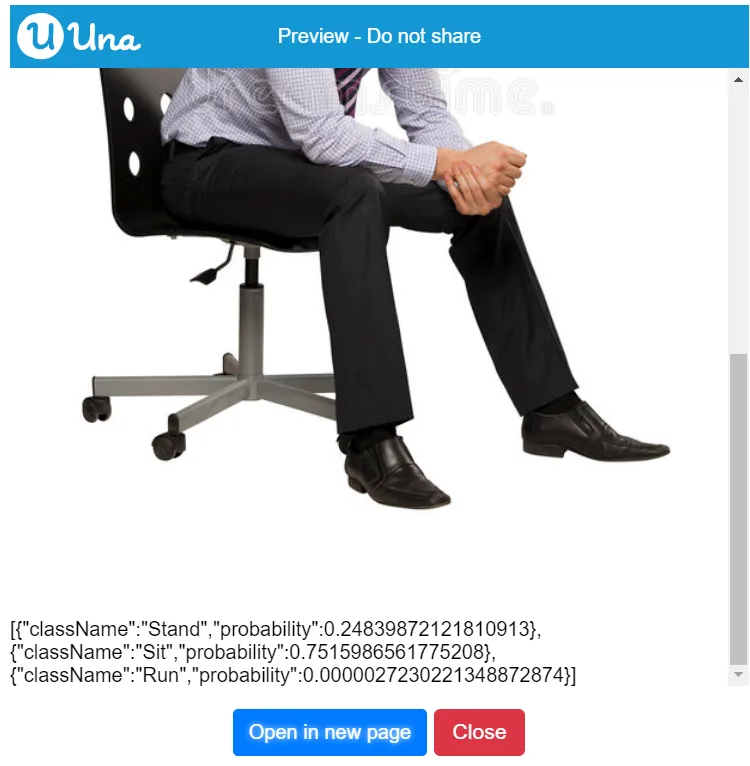
References:
- Trained Google Teachable Machine Model: https://teachablemachine.withgoogle.com/models/JtnKLVtv6/
- Photo being used in this example: https://thumbs.dreamstime.com/b/inviting-business-man-sitting-chair-relaxed-attitude-31717628.jpg

Showing the Class Labels in Pose Model
Pose Model get class labels
{"blocks":"<xml xmlns=\"https://developers.google.com/blockly/xml\"><block type=\"TeachableMachine_PoseModel_getClassLabels\"><value name=\"this\"><block type=\"variables_get\"><field name=\"VAR\">poseModel</field></block></value></block></xml>"}This is used for getting class labels from pose model.
Parameters: AI Model (Teachable Machine Pose Model)
Output: Array
Sample code:
{"blocks":"<xml xmlns=\"https://developers.google.com/blockly/xml\"><variables><variable>mainLayout</variable><variable>mainScreen</variable><variable>poseModel</variable><variable>predictionResult</variable><variable>labels</variable><variable>index</variable></variables><block type=\"pxt-on-start\" x=\"0\" y=\"0\"><statement name=\"HANDLER\"><block type=\"variables_set\"><field name=\"VAR\">mainLayout</field><value name=\"VALUE\"><shadow type=\"math_number\"><field name=\"NUM\">0</field></shadow><block type=\"ScreenItem_createLayout\"/></value><next><block type=\"variables_set\"><field name=\"VAR\">mainScreen</field><value name=\"VALUE\"><shadow type=\"math_number\"><field name=\"NUM\">0</field></shadow><block type=\"Screen_create\"><value name=\"label\"><shadow type=\"text\"><field name=\"TEXT\">Main</field></shadow></value><value name=\"layout\"><block type=\"variables_get\"><field name=\"VAR\">mainLayout</field></block></value></block></value><next><block type=\"variables_set\"><field name=\"VAR\">poseModel</field><value name=\"VALUE\"><shadow type=\"math_number\"><field name=\"NUM\">0</field></shadow><block type=\"TeachableMachine_loadPoseModel\"><value name=\"baseUrl\"><shadow type=\"text\"><field name=\"TEXT\">https://teachablemachine.withgoogle.com/models/LL-rF1gZS/</field></shadow></value></block></value><next><block type=\"variables_set\"><field name=\"VAR\">predictionResult</field><value name=\"VALUE\"><shadow type=\"math_number\"><field name=\"NUM\">0</field></shadow><block type=\"TeachableMachine_PoseModel_predict\"><value name=\"this\"><block type=\"variables_get\"><field name=\"VAR\">poseModel</field></block></value><value name=\"image\"><block type=\"Download_image\"><value name=\"url\"><shadow type=\"text\"><field name=\"TEXT\">https://i2.wp.com/runnersfirst.co.uk/wp-content/uploads/2019/01/running-woman.jpg?resize=678%2C381&ssl=1</field></shadow></value></block></value></block></value><next><block type=\"variables_set\"><field name=\"VAR\">labels</field><value name=\"VALUE\"><shadow type=\"math_number\"><field name=\"NUM\">0</field></shadow><block type=\"TeachableMachine_PoseModel_getClassLabels\"><value name=\"this\"><block type=\"variables_get\"><field name=\"VAR\">poseModel</field></block></value></block></value><next><block type=\"ScreenItem_Layout_add\"><value name=\"this\"><block type=\"variables_get\"><field name=\"VAR\">mainLayout</field></block></value><value name=\"item\"><block type=\"Download_image\"><value name=\"url\"><shadow type=\"text\"><field name=\"TEXT\">https://i2.wp.com/runnersfirst.co.uk/wp-content/uploads/2019/01/running-woman.jpg?resize=678%2C381&ssl=1</field></shadow></value></block></value><next><block type=\"ScreenItem_Layout_add\"><value name=\"this\"><block type=\"variables_get\"><field name=\"VAR\">mainLayout</field></block></value><value name=\"item\"><block type=\"Control_createTextBlock\"><mutation xmlns=\"http://www.w3.org/1999/xhtml\" _expanded=\"1\" _input_init=\"true\"></mutation><value name=\"text\"><block type=\"Json_JsonValue_stringify\"><mutation xmlns=\"http://www.w3.org/1999/xhtml\" _expanded=\"0\" _input_init=\"false\"></mutation><value name=\"jsonValue\"><block type=\"TeachableMachine_ImagePredictionResult_getResultAsJsonValue\"><value name=\"this\"><block type=\"variables_get\"><field name=\"VAR\">predictionResult</field></block></value></block></value></block></value></block></value><next><block type=\"pxt_controls_for\"><value name=\"VAR\"><shadow type=\"variables_get_reporter\"><field name=\"VAR\">index</field></shadow></value><value name=\"TO\"><shadow type=\"math_whole_number\"><field name=\"NUM\">0</field></shadow><block type=\"lists_length\"><value name=\"VALUE\"><block type=\"variables_get\"><field name=\"VAR\">labels</field></block></value></block></value><statement name=\"DO\"><block type=\"ScreenItem_Layout_add\"><value name=\"this\"><block type=\"variables_get\"><field name=\"VAR\">mainLayout</field></block></value><value name=\"item\"><block type=\"Control_createTextBlock\"><mutation xmlns=\"http://www.w3.org/1999/xhtml\" _expanded=\"1\" _input_init=\"true\"></mutation><value name=\"text\"><block type=\"lists_index_get\"><value name=\"LIST\"><block type=\"variables_get\"><field name=\"VAR\">labels</field></block></value><value name=\"INDEX\"><shadow type=\"math_number\"><field name=\"NUM\">0</field></shadow><block type=\"variables_get\"><field name=\"VAR\">index</field></block></value></block></value></block></value></block></statement></block></next></block></next></block></next></block></next></block></next></block></next></block></next></block></statement></block></xml>"}The output:
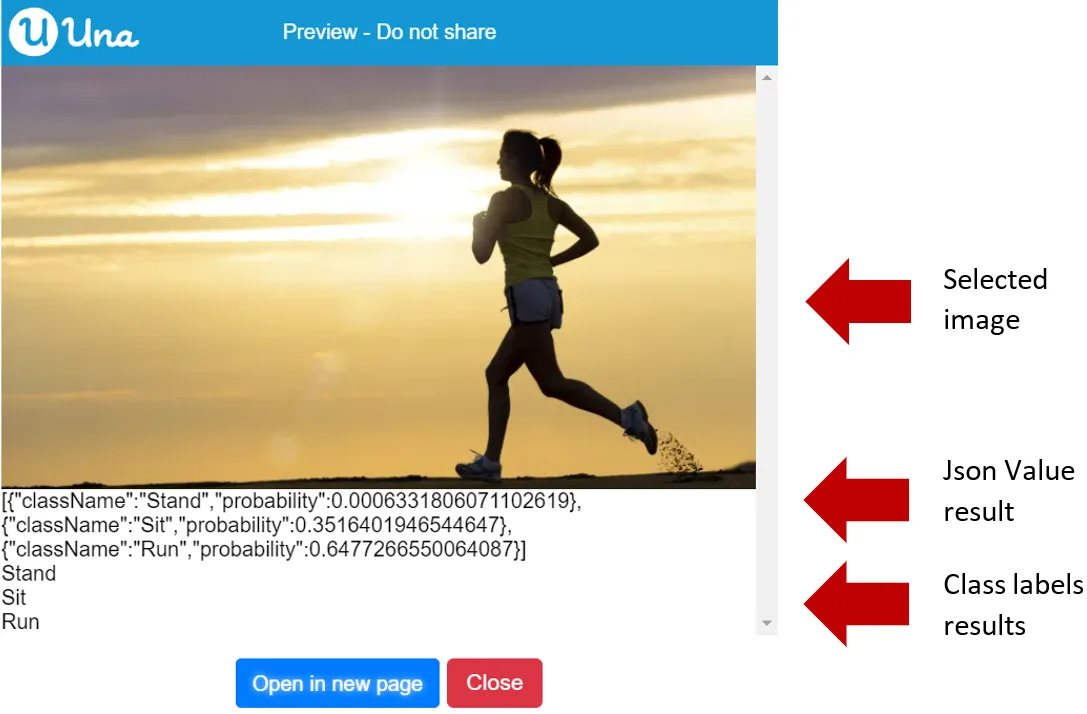
References:
- Trained Google Teachable Machine Model: https://teachablemachine.withgoogle.com/models/LL-rF1gZS/
- Photo being used in this example: https://i2.wp.com/runnersfirst.co.uk/wp-content/uploads/2019/01/running-woman.jpg?resize=678%2C381&ssl=1
Showing the Total Amount of Classes with Pose Model
Pose Model get total number of classes
{"blocks":"<xml xmlns=\"https://developers.google.com/blockly/xml\"><block type=\"TeachableMachine_PoseModel_getTotalClasses\"><value name=\"this\"><block type=\"variables_get\"><field name=\"VAR\">poseModel</field></block></value></block></xml>"}This is used to get the full number of classes from pose model.
Parameters: AI Model (Teachable Machine Pose Model)
Output: Number
Sample code:
{"blocks":"<xml xmlns=\"https://developers.google.com/blockly/xml\"><variables><variable>mainLayout</variable><variable>mainScreen</variable><variable>poseModel</variable><variable>classify</variable><variable>total</variable><variable>dateTimeOffset</variable></variables><block type=\"pxt-on-start\" x=\"0\" y=\"0\"><statement name=\"HANDLER\"><block type=\"variables_set\"><field name=\"VAR\">mainLayout</field><value name=\"VALUE\"><shadow type=\"math_number\"><field name=\"NUM\">0</field></shadow><block type=\"ScreenItem_createLayout\"/></value><next><block type=\"variables_set\"><field name=\"VAR\">mainScreen</field><value name=\"VALUE\"><shadow type=\"math_number\"><field name=\"NUM\">0</field></shadow><block type=\"Screen_create\"><value name=\"label\"><shadow type=\"text\"><field name=\"TEXT\">Main</field></shadow></value><value name=\"layout\"><block type=\"variables_get\"><field name=\"VAR\">mainLayout</field></block></value></block></value><next><block type=\"variables_set\"><field name=\"VAR\">poseModel</field><value name=\"VALUE\"><shadow type=\"math_number\"><field name=\"NUM\">0</field></shadow><block type=\"TeachableMachine_loadPoseModel\"><value name=\"baseUrl\"><shadow type=\"text\"><field name=\"TEXT\">https://teachablemachine.withgoogle.com/models/LL-rF1gZS/</field></shadow></value></block></value><next><block type=\"variables_set\"><field name=\"VAR\">classify</field><value name=\"VALUE\"><shadow type=\"math_number\"><field name=\"NUM\">0</field></shadow><block type=\"TeachableMachine_PoseModel_predict\"><value name=\"this\"><block type=\"variables_get\"><field name=\"VAR\">poseModel</field></block></value><value name=\"image\"><block type=\"Download_image\"><value name=\"url\"><shadow type=\"text\"><field name=\"TEXT\">https://i2.wp.com/runnersfirst.co.uk/wp-content/uploads/2019/01/running-woman.jpg?resize=678%2C381&ssl=1</field></shadow></value></block></value></block></value><next><block type=\"variables_set\"><field name=\"VAR\">total</field><value name=\"VALUE\"><shadow type=\"math_number\"><field name=\"NUM\">0</field></shadow><block type=\"TeachableMachine_PoseModel_getTotalClasses\"><value name=\"this\"><block type=\"variables_get\"><field name=\"VAR\">poseModel</field></block></value></block></value><next><block type=\"ScreenItem_Layout_add\"><value name=\"this\"><block type=\"variables_get\"><field name=\"VAR\">mainLayout</field></block></value><value name=\"item\"><block type=\"Download_image\"><value name=\"url\"><shadow type=\"text\"><field name=\"TEXT\">https://i2.wp.com/runnersfirst.co.uk/wp-content/uploads/2019/01/running-woman.jpg?resize=678%2C381&ssl=1</field></shadow></value></block></value><next><block type=\"ScreenItem_Layout_add\"><value name=\"this\"><block type=\"variables_get\"><field name=\"VAR\">mainLayout</field></block></value><value name=\"item\"><block type=\"Control_createTextBlock\"><mutation xmlns=\"http://www.w3.org/1999/xhtml\" _expanded=\"1\" _input_init=\"true\"></mutation><value name=\"text\"><block type=\"Json_JsonValue_stringify\"><mutation xmlns=\"http://www.w3.org/1999/xhtml\" _expanded=\"0\" _input_init=\"false\"></mutation><value name=\"jsonValue\"><block type=\"TeachableMachine_ImagePredictionResult_getResultAsJsonValue\"><value name=\"this\"><block type=\"variables_get\"><field name=\"VAR\">classify</field></block></value></block></value></block></value></block></value><next><block type=\"ScreenItem_Layout_add\"><value name=\"this\"><block type=\"variables_get\"><field name=\"VAR\">mainLayout</field></block></value><value name=\"item\"><block type=\"Control_createTextBlock\"><mutation xmlns=\"http://www.w3.org/1999/xhtml\" _expanded=\"1\" _input_init=\"true\"></mutation><value name=\"text\"><block type=\"DateTime_DateTimeOffset_toString\"><value name=\"dateTimeOffset\"><block type=\"variables_get\"><field name=\"VAR\">total</field></block></value></block></value></block></value></block></next></block></next></block></next></block></next></block></next></block></next></block></next></block></statement></block></xml>"}The output:
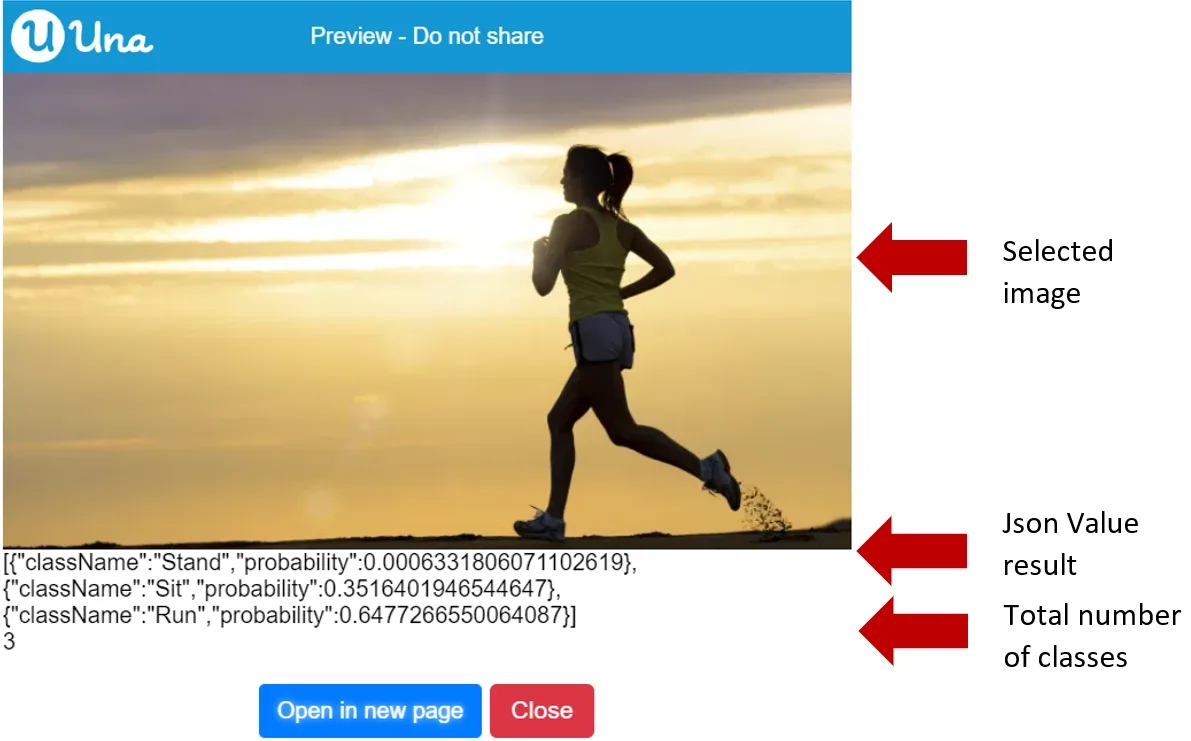
References:
- Trained Google Teachable Machine Model: https://teachablemachine.withgoogle.com/models/LL-rF1gZS/
- Photo being used in this example: https://i2.wp.com/runnersfirst.co.uk/wp-content/uploads/2019/01/running-woman.jpg?resize=678%2C381&ssl=1
Result
According to the Order of Probability to Predict Results
Prediction Result order by probability
{"blocks":"<xml xmlns=\"https://developers.google.com/blockly/xml\"><block type=\"TeachableMachine_ImagePredictionResult_orderByProbability\"><mutation xmlns=\"http://www.w3.org/1999/xhtml\" _expanded=\"0\" _input_init=\"false\"></mutation><value name=\"this\"><block type=\"variables_get\"><field name=\"VAR\">predictionResult</field></block></value></block></xml>"}This is used to order the prediction result by probability.
Parameters:
- AI Model (Teachable Machine Pose Model)
- Condition: ascending (Default)/descending
Output: N/A
Sample code:
{"blocks":"<xml xmlns=\"https://developers.google.com/blockly/xml\"><variables><variable>mainLayout</variable><variable>mainScreen</variable><variable>poseModel</variable><variable>predictionResult</variable></variables><block type=\"pxt-on-start\" x=\"0\" y=\"0\"><statement name=\"HANDLER\"><block type=\"variables_set\"><field name=\"VAR\">mainLayout</field><value name=\"VALUE\"><shadow type=\"math_number\"><field name=\"NUM\">0</field></shadow><block type=\"ScreenItem_createLayout\"/></value><next><block type=\"variables_set\"><field name=\"VAR\">mainScreen</field><value name=\"VALUE\"><shadow type=\"math_number\"><field name=\"NUM\">0</field></shadow><block type=\"Screen_create\"><value name=\"label\"><shadow type=\"text\"><field name=\"TEXT\">Main</field></shadow></value><value name=\"layout\"><block type=\"variables_get\"><field name=\"VAR\">mainLayout</field></block></value></block></value><next><block type=\"variables_set\"><field name=\"VAR\">poseModel</field><value name=\"VALUE\"><shadow type=\"math_number\"><field name=\"NUM\">0</field></shadow><block type=\"TeachableMachine_loadPoseModel\"><value name=\"baseUrl\"><shadow type=\"text\"><field name=\"TEXT\">https://teachablemachine.withgoogle.com/models/LL-rF1gZS/</field></shadow></value></block></value><next><block type=\"variables_set\"><field name=\"VAR\">predictionResult</field><value name=\"VALUE\"><shadow type=\"math_number\"><field name=\"NUM\">0</field></shadow><block type=\"TeachableMachine_PoseModel_predict\"><value name=\"this\"><block type=\"variables_get\"><field name=\"VAR\">poseModel</field></block></value><value name=\"image\"><block type=\"Download_image\"><value name=\"url\"><shadow type=\"text\"><field name=\"TEXT\">https://i2.wp.com/runnersfirst.co.uk/wp-content/uploads/2019/01/running-woman.jpg?resize=678%2C381&ssl=1</field></shadow></value></block></value></block></value><next><block type=\"TeachableMachine_ImagePredictionResult_orderByProbability\"><mutation xmlns=\"http://www.w3.org/1999/xhtml\" _expanded=\"1\" _input_init=\"true\"></mutation><field name=\"order\">SortingOrder.Ascending</field><value name=\"this\"><block type=\"variables_get\"><field name=\"VAR\">predictionResult</field></block></value><next><block type=\"ScreenItem_Layout_add\"><value name=\"this\"><block type=\"variables_get\"><field name=\"VAR\">mainLayout</field></block></value><value name=\"item\"><block type=\"Download_image\"><value name=\"url\"><shadow type=\"text\"><field name=\"TEXT\">https://i2.wp.com/runnersfirst.co.uk/wp-content/uploads/2019/01/running-woman.jpg?resize=678%2C381&ssl=1</field></shadow></value></block></value><next><block type=\"ScreenItem_Layout_add\"><value name=\"this\"><block type=\"variables_get\"><field name=\"VAR\">mainLayout</field></block></value><value name=\"item\"><block type=\"Control_createTextBlock\"><mutation xmlns=\"http://www.w3.org/1999/xhtml\" _expanded=\"1\" _input_init=\"true\"></mutation><value name=\"text\"><block type=\"Json_JsonValue_stringify\"><mutation xmlns=\"http://www.w3.org/1999/xhtml\" _expanded=\"0\" _input_init=\"false\"></mutation><value name=\"jsonValue\"><block type=\"TeachableMachine_ImagePredictionResult_getResultAsJsonValue\"><value name=\"this\"><block type=\"variables_get\"><field name=\"VAR\">predictionResult</field></block></value></block></value></block></value></block></value></block></next></block></next></block></next></block></next></block></next></block></next></block></statement></block></xml>"}When it is in ascending order, the output:
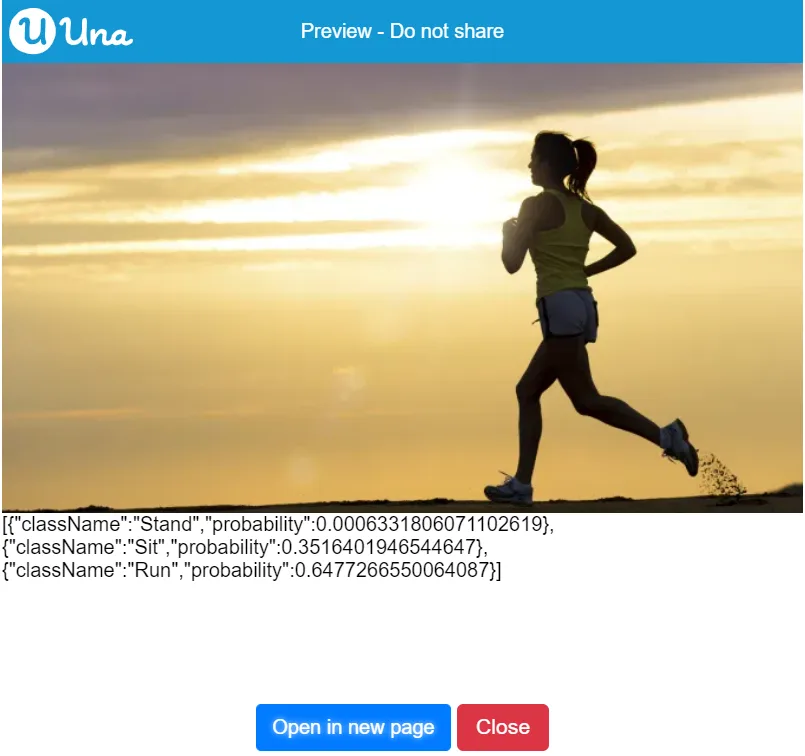
When it is in descending order, the output:
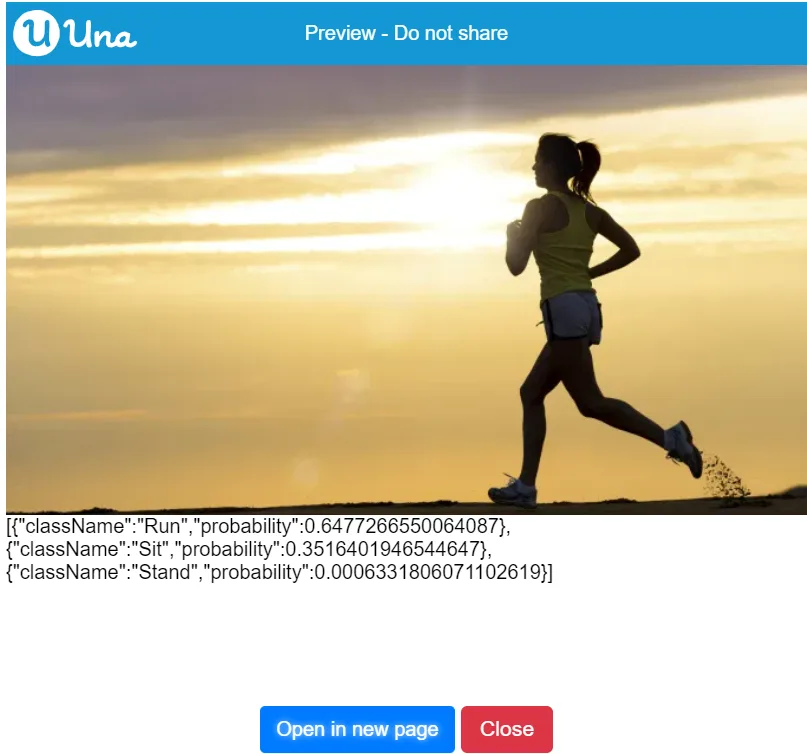
References:
- Trained Google Teachable Machine Model: https://teachablemachine.withgoogle.com/models/LL-rF1gZS/
- Photo being used in this example: https://i2.wp.com/runnersfirst.co.uk/wp-content/uploads/2019/01/running-woman.jpg?resize=678%2C381&ssl=1
Showing Prediction Result Items
Prediction Result get result items
{"blocks":"<xml xmlns=\"https://developers.google.com/blockly/xml\"><block type=\"TeachableMachine_ImagePredictionResult_getResultItems\"><value name=\"this\"><block type=\"variables_get\"><field name=\"VAR\">predictionResult</field></block></value></block></xml>"}It is used to get the result item for getting result using probability or class label.
Parameters: AI Model (Teachable Machine Prediction Result)
Output: Array
Sample code:
{"blocks":"<xml xmlns=\"https://developers.google.com/blockly/xml\"><variables><variable>mainLayout</variable><variable>mainScreen</variable><variable>imageModel</variable><variable>downloadImage</variable><variable>predictionResult</variable><variable>resultItems</variable><variable>probability</variable><variable>dateTimeOffset</variable></variables><block type=\"pxt-on-start\" x=\"0\" y=\"0\"><statement name=\"HANDLER\"><block type=\"variables_set\"><field name=\"VAR\">mainLayout</field><value name=\"VALUE\"><shadow type=\"math_number\"><field name=\"NUM\">0</field></shadow><block type=\"ScreenItem_createLayout\"/></value><next><block type=\"variables_set\"><field name=\"VAR\">mainScreen</field><value name=\"VALUE\"><shadow type=\"math_number\"><field name=\"NUM\">0</field></shadow><block type=\"Screen_create\"><value name=\"label\"><shadow type=\"text\"><field name=\"TEXT\">Main</field></shadow></value><value name=\"layout\"><block type=\"variables_get\"><field name=\"VAR\">mainLayout</field></block></value></block></value><next><block type=\"variables_set\"><field name=\"VAR\">imageModel</field><value name=\"VALUE\"><shadow type=\"math_number\"><field name=\"NUM\">0</field></shadow><block type=\"TeachableMachine_loadImageModel\"><value name=\"baseUrl\"><shadow type=\"text\"><field name=\"TEXT\">https://teachablemachine.withgoogle.com/models/tghdF3FXI/</field></shadow></value></block></value><next><block type=\"variables_set\"><field name=\"VAR\">downloadImage</field><value name=\"VALUE\"><shadow type=\"math_number\"><field name=\"NUM\">0</field></shadow><block type=\"Download_image\"><value name=\"url\"><shadow type=\"text\"><field name=\"TEXT\">https://image.shutterstock.com/image-photo/boy-raising-two-fingers-on-260nw-297974771.jpg</field></shadow></value></block></value><next><block type=\"variables_set\"><field name=\"VAR\">predictionResult</field><value name=\"VALUE\"><shadow type=\"math_number\"><field name=\"NUM\">0</field></shadow><block type=\"TeachableMachine_ImageModel_predict\"><value name=\"this\"><block type=\"variables_get\"><field name=\"VAR\">imageModel</field></block></value><value name=\"image\"><block type=\"variables_get\"><field name=\"VAR\">downloadImage</field></block></value></block></value><next><block type=\"variables_set\"><field name=\"VAR\">resultItems</field><value name=\"VALUE\"><shadow type=\"math_number\"><field name=\"NUM\">0</field></shadow><block type=\"lists_index_get\"><value name=\"LIST\"><block type=\"TeachableMachine_ImagePredictionResult_getResultItems\"><value name=\"this\"><block type=\"variables_get\"><field name=\"VAR\">predictionResult</field></block></value></block></value><value name=\"INDEX\"><shadow type=\"math_number\"><field name=\"NUM\">0</field></shadow></value></block></value><next><block type=\"variables_set\"><field name=\"VAR\">probability</field><value name=\"VALUE\"><shadow type=\"math_number\"><field name=\"NUM\">0</field></shadow><block type=\"TeachableMachine_PredictionResultItem_getProbability\"><value name=\"this\"><block type=\"variables_get\"><field name=\"VAR\">resultItems</field></block></value></block></value><next><block type=\"ScreenItem_Layout_add\"><value name=\"this\"><block type=\"variables_get\"><field name=\"VAR\">mainLayout</field></block></value><value name=\"item\"><block type=\"variables_get\"><field name=\"VAR\">downloadImage</field></block></value><next><block type=\"ScreenItem_Layout_add\"><value name=\"this\"><block type=\"variables_get\"><field name=\"VAR\">mainLayout</field></block></value><value name=\"item\"><block type=\"Control_createTextBlock\"><mutation xmlns=\"http://www.w3.org/1999/xhtml\" _expanded=\"1\" _input_init=\"true\"></mutation><value name=\"text\"><block type=\"DateTime_DateTimeOffset_toString\"><value name=\"dateTimeOffset\"><block type=\"variables_get\"><field name=\"VAR\">probability</field></block></value></block></value></block></value><next><block type=\"ScreenItem_Layout_add\"><value name=\"this\"><block type=\"variables_get\"><field name=\"VAR\">mainLayout</field></block></value><value name=\"item\"><block type=\"Control_createTextBlock\"><mutation xmlns=\"http://www.w3.org/1999/xhtml\" _expanded=\"1\" _input_init=\"true\"></mutation><value name=\"text\"><block type=\"TeachableMachine_PredictionResultItem_getClassLabel\"><value name=\"this\"><block type=\"variables_get\"><field name=\"VAR\">resultItems</field></block></value></block></value></block></value></block></next></block></next></block></next></block></next></block></next></block></next></block></next></block></next></block></next></block></statement></block></xml>"}The output:
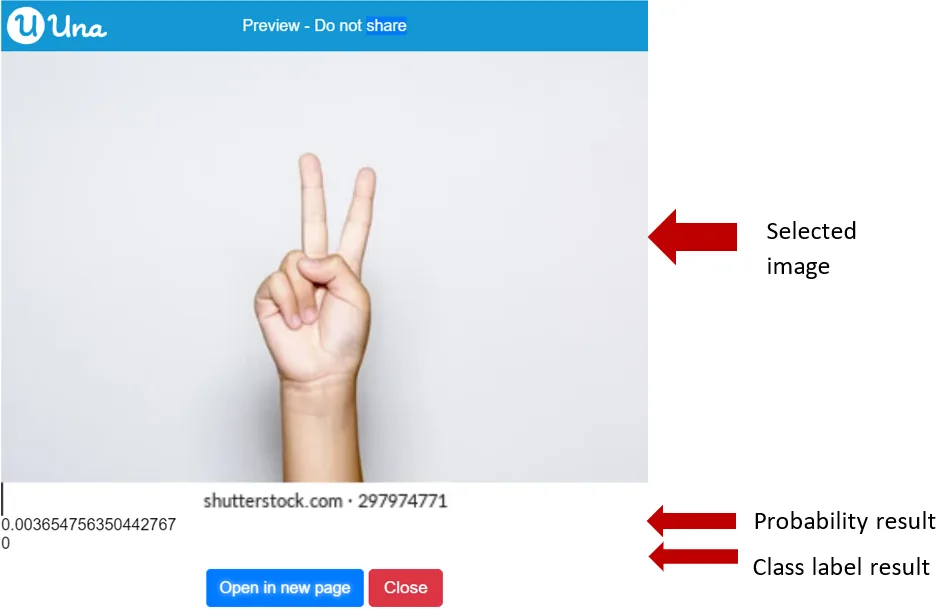
References:
- Trained Google Teachable Machine Model: https://teachablemachine.withgoogle.com/models/tghdF3FXI/
- Photo being used in this example: https://image.shutterstock.com/image-photo/boy-raising-two-fingers-on-260nw-297974771.jpg
Converting Prediction Result to JsonValue
Prediction Result get results as JsonValue
{"blocks":"<xml xmlns=\"https://developers.google.com/blockly/xml\"><block type=\"TeachableMachine_ImagePredictionResult_getResultAsJsonValue\"><value name=\"this\"><block type=\"variables_get\"><field name=\"VAR\">predictionResult</field></block></value></block></xml>"}This is used to convert the image prediction result to Json Value.
Parameters: Model Prediction Result (Teachable Machine Pose Model)
Output: Json Value
Sample code:
{"blocks":"<xml xmlns=\"https://developers.google.com/blockly/xml\"><variables><variable>mainLayout</variable><variable>mainScreen</variable><variable>poseModel</variable><variable>classify</variable></variables><block type=\"pxt-on-start\" x=\"0\" y=\"0\"><statement name=\"HANDLER\"><block type=\"variables_set\"><field name=\"VAR\">mainLayout</field><value name=\"VALUE\"><shadow type=\"math_number\"><field name=\"NUM\">0</field></shadow><block type=\"ScreenItem_createLayout\"/></value><next><block type=\"variables_set\"><field name=\"VAR\">mainScreen</field><value name=\"VALUE\"><shadow type=\"math_number\"><field name=\"NUM\">0</field></shadow><block type=\"Screen_create\"><value name=\"label\"><shadow type=\"text\"><field name=\"TEXT\">Main</field></shadow></value><value name=\"layout\"><block type=\"variables_get\"><field name=\"VAR\">mainLayout</field></block></value></block></value><next><block type=\"variables_set\"><field name=\"VAR\">poseModel</field><value name=\"VALUE\"><shadow type=\"math_number\"><field name=\"NUM\">0</field></shadow><block type=\"TeachableMachine_loadPoseModel\"><value name=\"baseUrl\"><shadow type=\"text\"><field name=\"TEXT\">https://teachablemachine.withgoogle.com/models/LL-rF1gZS/</field></shadow></value></block></value><next><block type=\"variables_set\"><field name=\"VAR\">classify</field><value name=\"VALUE\"><shadow type=\"math_number\"><field name=\"NUM\">0</field></shadow><block type=\"TeachableMachine_PoseModel_predict\"><value name=\"this\"><block type=\"variables_get\"><field name=\"VAR\">poseModel</field></block></value><value name=\"image\"><block type=\"Download_image\"><value name=\"url\"><shadow type=\"text\"><field name=\"TEXT\">https://i2.wp.com/runnersfirst.co.uk/wp-content/uploads/2019/01/running-woman.jpg?resize=678%2C381&ssl=1</field></shadow></value></block></value></block></value><next><block type=\"ScreenItem_Layout_add\"><value name=\"this\"><block type=\"variables_get\"><field name=\"VAR\">mainLayout</field></block></value><value name=\"item\"><block type=\"Download_image\"><value name=\"url\"><shadow type=\"text\"><field name=\"TEXT\">https://i2.wp.com/runnersfirst.co.uk/wp-content/uploads/2019/01/running-woman.jpg?resize=678%2C381&ssl=1</field></shadow></value></block></value><next><block type=\"ScreenItem_Layout_add\"><value name=\"this\"><block type=\"variables_get\"><field name=\"VAR\">mainLayout</field></block></value><value name=\"item\"><block type=\"Control_createTextBlock\"><mutation xmlns=\"http://www.w3.org/1999/xhtml\" _expanded=\"1\" _input_init=\"true\"></mutation><value name=\"text\"><block type=\"Json_JsonValue_stringify\"><mutation xmlns=\"http://www.w3.org/1999/xhtml\" _expanded=\"0\" _input_init=\"false\"></mutation><value name=\"jsonValue\"><block type=\"TeachableMachine_ImagePredictionResult_getResultAsJsonValue\"><value name=\"this\"><block type=\"variables_get\"><field name=\"VAR\">classify</field></block></value></block></value></block></value></block></value></block></next></block></next></block></next></block></next></block></next></block></statement></block></xml>"}The output:
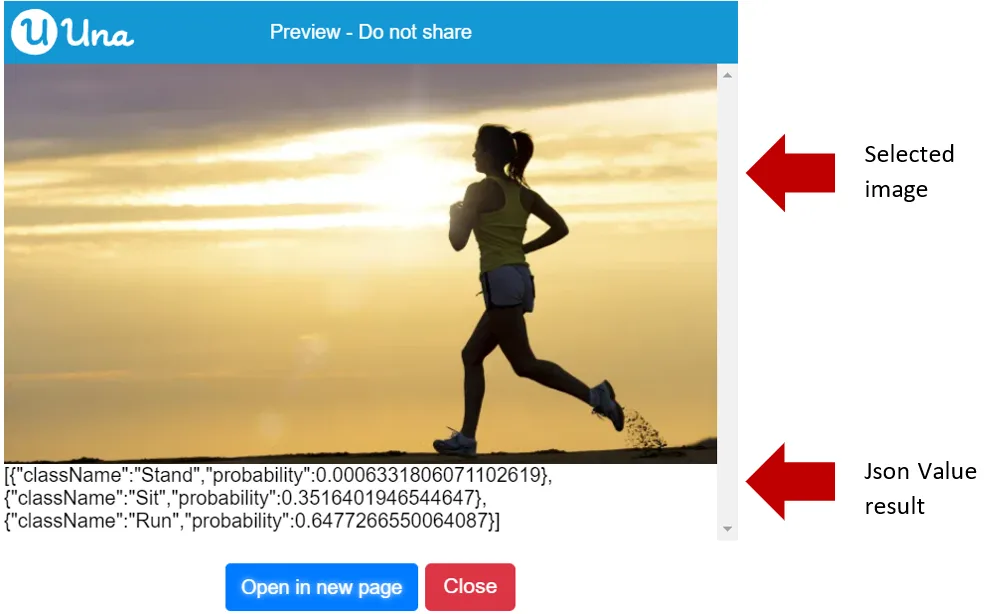
References:
- Trained Google Teachable Machine Model: https://teachablemachine.withgoogle.com/models/LL-rF1gZS/
- Photo being used in this example: https://i2.wp.com/runnersfirst.co.uk/wp-content/uploads/2019/01/running-woman.jpg?resize=678%2C381&ssl=1
Result Item
Showing Probability Using Result Item
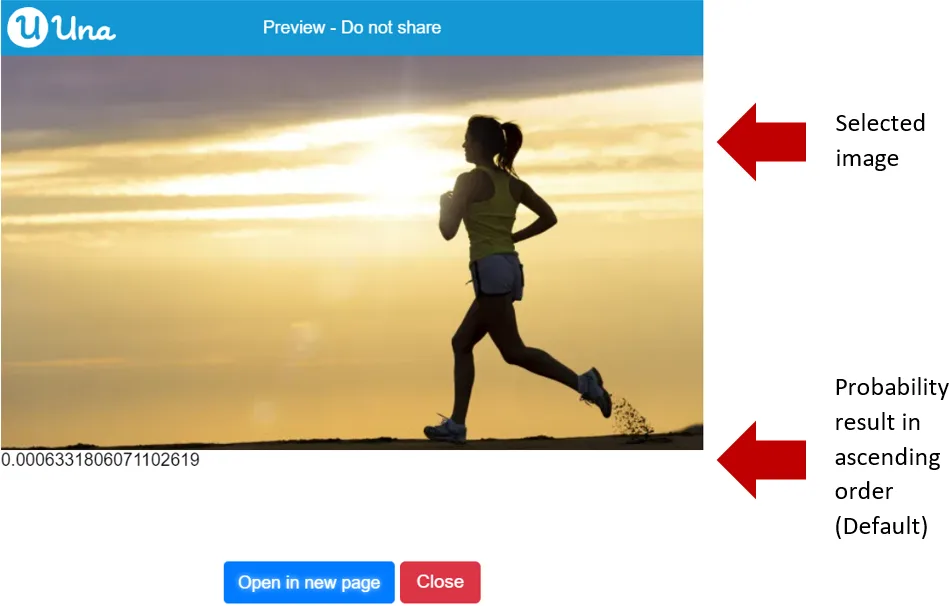
Result Item get probability
{"blocks":"<xml xmlns=\"https://developers.google.com/blockly/xml\"><block type=\"TeachableMachine_PredictionResultItem_getProbability\"><value name=\"this\"><block type=\"variables_get\"><field name=\"VAR\">resultItem</field></block></value></block></xml>"}This is used to get the probability from result item.
Parameters: Model Prediction Result (Teachable Machine Pose Model)
Output: Json Value
Sample code:
{"blocks":"<xml xmlns=\"https://developers.google.com/blockly/xml\"><variables><variable>mainLayout</variable><variable>mainScreen</variable><variable>imageModel</variable><variable>downloadImage</variable><variable>predictionResult</variable><variable>resultItems</variable><variable>probability</variable><variable>dateTimeOffset</variable></variables><block type=\"pxt-on-start\" x=\"0\" y=\"0\"><statement name=\"HANDLER\"><block type=\"variables_set\"><field name=\"VAR\">mainLayout</field><value name=\"VALUE\"><shadow type=\"math_number\"><field name=\"NUM\">0</field></shadow><block type=\"ScreenItem_createLayout\"/></value><next><block type=\"variables_set\"><field name=\"VAR\">mainScreen</field><value name=\"VALUE\"><shadow type=\"math_number\"><field name=\"NUM\">0</field></shadow><block type=\"Screen_create\"><value name=\"label\"><shadow type=\"text\"><field name=\"TEXT\">Main</field></shadow></value><value name=\"layout\"><block type=\"variables_get\"><field name=\"VAR\">mainLayout</field></block></value></block></value><next><block type=\"variables_set\"><field name=\"VAR\">imageModel</field><value name=\"VALUE\"><shadow type=\"math_number\"><field name=\"NUM\">0</field></shadow><block type=\"TeachableMachine_loadPoseModel\"><value name=\"baseUrl\"><shadow type=\"text\"><field name=\"TEXT\">https://teachablemachine.withgoogle.com/models/LL-rF1gZS/</field></shadow></value></block></value><next><block type=\"variables_set\"><field name=\"VAR\">downloadImage</field><value name=\"VALUE\"><shadow type=\"math_number\"><field name=\"NUM\">0</field></shadow><block type=\"Download_image\"><value name=\"url\"><shadow type=\"text\"><field name=\"TEXT\">https://i2.wp.com/runnersfirst.co.uk/wp-content/uploads/2019/01/running-woman.jpg?resize=678%2C381&ssl=1</field></shadow></value></block></value><next><block type=\"variables_set\"><field name=\"VAR\">predictionResult</field><value name=\"VALUE\"><shadow type=\"math_number\"><field name=\"NUM\">0</field></shadow><block type=\"TeachableMachine_PoseModel_predict\"><value name=\"this\"><block type=\"variables_get\"><field name=\"VAR\">imageModel</field></block></value><value name=\"image\"><block type=\"variables_get\"><field name=\"VAR\">downloadImage</field></block></value></block></value><next><block type=\"variables_set\"><field name=\"VAR\">resultItems</field><value name=\"VALUE\"><shadow type=\"math_number\"><field name=\"NUM\">0</field></shadow><block type=\"lists_index_get\"><value name=\"LIST\"><block type=\"TeachableMachine_ImagePredictionResult_getResultItems\"><value name=\"this\"><block type=\"variables_get\"><field name=\"VAR\">predictionResult</field></block></value></block></value><value name=\"INDEX\"><shadow type=\"math_number\"><field name=\"NUM\">0</field></shadow></value></block></value><next><block type=\"variables_set\"><field name=\"VAR\">probability</field><value name=\"VALUE\"><shadow type=\"math_number\"><field name=\"NUM\">0</field></shadow><block type=\"TeachableMachine_PredictionResultItem_getProbability\"><value name=\"this\"><block type=\"variables_get\"><field name=\"VAR\">resultItems</field></block></value></block></value><next><block type=\"ScreenItem_Layout_add\"><value name=\"this\"><block type=\"variables_get\"><field name=\"VAR\">mainLayout</field></block></value><value name=\"item\"><block type=\"variables_get\"><field name=\"VAR\">downloadImage</field></block></value><next><block type=\"ScreenItem_Layout_add\"><value name=\"this\"><block type=\"variables_get\"><field name=\"VAR\">mainLayout</field></block></value><value name=\"item\"><block type=\"Control_createTextBlock\"><mutation xmlns=\"http://www.w3.org/1999/xhtml\" _expanded=\"1\" _input_init=\"true\"></mutation><value name=\"text\"><block type=\"DateTime_DateTimeOffset_toString\"><value name=\"dateTimeOffset\"><block type=\"variables_get\"><field name=\"VAR\">probability</field></block></value></block></value></block></value></block></next></block></next></block></next></block></next></block></next></block></next></block></next></block></next></block></statement></block></xml>"}The output:
References:
- Trained Google Teachable Machine Model: https://teachablemachine.withgoogle.com/models/LL-rF1gZS/
- Photo being used in this example: https://i2.wp.com/runnersfirst.co.uk/wp-content/uploads/2019/01/running-woman.jpg?resize=678%2C381&ssl=1
Showing Class Label Using Result Item
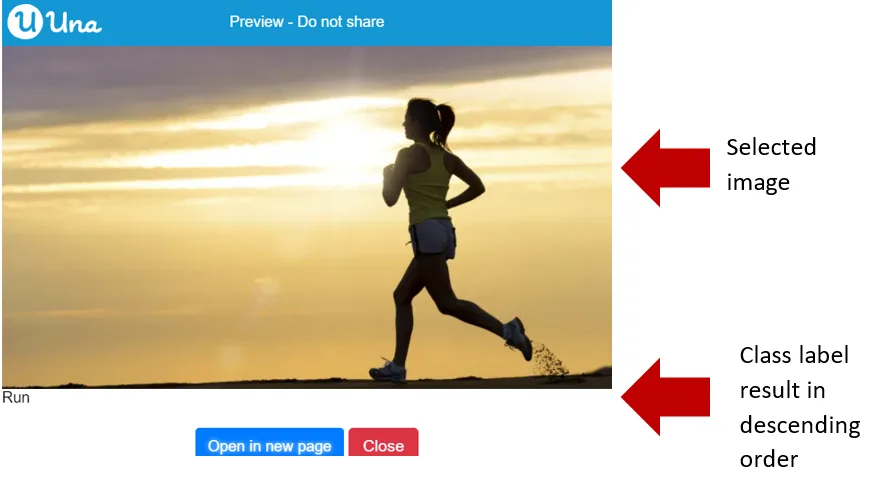
Result Item get class label
{"blocks":"<xml xmlns=\"https://developers.google.com/blockly/xml\"><block type=\"TeachableMachine_PredictionResultItem_getClassLabel\"><value name=\"this\"><block type=\"variables_get\"><field name=\"VAR\">resultItem</field></block></value></block></xml>"}This is used to get class label from result item.
Parameters: AI Model (Teachable Machine Result Item)
Output: String
Sample code:
{"blocks":"<xml xmlns=\"https://developers.google.com/blockly/xml\"><variables><variable>mainLayout</variable><variable>mainScreen</variable><variable>imageModel</variable><variable>downloadImage</variable><variable>predictionResult</variable><variable>resultItems</variable></variables><block type=\"pxt-on-start\" x=\"0\" y=\"0\"><statement name=\"HANDLER\"><block type=\"variables_set\"><field name=\"VAR\">mainLayout</field><value name=\"VALUE\"><shadow type=\"math_number\"><field name=\"NUM\">0</field></shadow><block type=\"ScreenItem_createLayout\"/></value><next><block type=\"variables_set\"><field name=\"VAR\">mainScreen</field><value name=\"VALUE\"><shadow type=\"math_number\"><field name=\"NUM\">0</field></shadow><block type=\"Screen_create\"><value name=\"label\"><shadow type=\"text\"><field name=\"TEXT\">Main</field></shadow></value><value name=\"layout\"><block type=\"variables_get\"><field name=\"VAR\">mainLayout</field></block></value></block></value><next><block type=\"variables_set\"><field name=\"VAR\">imageModel</field><value name=\"VALUE\"><shadow type=\"math_number\"><field name=\"NUM\">0</field></shadow><block type=\"TeachableMachine_loadPoseModel\"><value name=\"baseUrl\"><shadow type=\"text\"><field name=\"TEXT\">https://teachablemachine.withgoogle.com/models/LL-rF1gZS/</field></shadow></value></block></value><next><block type=\"variables_set\"><field name=\"VAR\">downloadImage</field><value name=\"VALUE\"><shadow type=\"math_number\"><field name=\"NUM\">0</field></shadow><block type=\"Download_image\"><value name=\"url\"><shadow type=\"text\"><field name=\"TEXT\">https://i2.wp.com/runnersfirst.co.uk/wp-content/uploads/2019/01/running-woman.jpg?resize=678%2C381&ssl=1</field></shadow></value></block></value><next><block type=\"variables_set\"><field name=\"VAR\">predictionResult</field><value name=\"VALUE\"><shadow type=\"math_number\"><field name=\"NUM\">0</field></shadow><block type=\"TeachableMachine_PoseModel_predict\"><value name=\"this\"><block type=\"variables_get\"><field name=\"VAR\">imageModel</field></block></value><value name=\"image\"><block type=\"variables_get\"><field name=\"VAR\">downloadImage</field></block></value></block></value><next><block type=\"TeachableMachine_ImagePredictionResult_orderByProbability\"><mutation xmlns=\"http://www.w3.org/1999/xhtml\" _expanded=\"1\" _input_init=\"true\"></mutation><field name=\"order\">SortingOrder.Descending</field><value name=\"this\"><block type=\"variables_get\"><field name=\"VAR\">predictionResult</field></block></value><next><block type=\"variables_set\"><field name=\"VAR\">resultItems</field><value name=\"VALUE\"><shadow type=\"math_number\"><field name=\"NUM\">0</field></shadow><block type=\"lists_index_get\"><value name=\"LIST\"><block type=\"TeachableMachine_ImagePredictionResult_getResultItems\"><value name=\"this\"><block type=\"variables_get\"><field name=\"VAR\">predictionResult</field></block></value></block></value><value name=\"INDEX\"><shadow type=\"math_number\"><field name=\"NUM\">0</field></shadow></value></block></value><next><block type=\"ScreenItem_Layout_add\"><value name=\"this\"><block type=\"variables_get\"><field name=\"VAR\">mainLayout</field></block></value><value name=\"item\"><block type=\"variables_get\"><field name=\"VAR\">downloadImage</field></block></value><next><block type=\"ScreenItem_Layout_add\"><value name=\"this\"><block type=\"variables_get\"><field name=\"VAR\">mainLayout</field></block></value><value name=\"item\"><block type=\"Control_createTextBlock\"><mutation xmlns=\"http://www.w3.org/1999/xhtml\" _expanded=\"1\" _input_init=\"true\"></mutation><value name=\"text\"><block type=\"TeachableMachine_PredictionResultItem_getClassLabel\"><value name=\"this\"><block type=\"variables_get\"><field name=\"VAR\">resultItems</field></block></value></block></value></block></value></block></next></block></next></block></next></block></next></block></next></block></next></block></next></block></next></block></statement></block></xml>"}The output:
References:
- Trained Google Teachable Machine Model: https://teachablemachine.withgoogle.com/models/LL-rF1gZS/
- Photo being used in this example: https://i2.wp.com/runnersfirst.co.uk/wp-content/uploads/2019/01/running-woman.jpg?resize=678%2C381&ssl=1